
A flexible all-in-one productivity platform for managing tasks, docs, chat, and goals in one place.
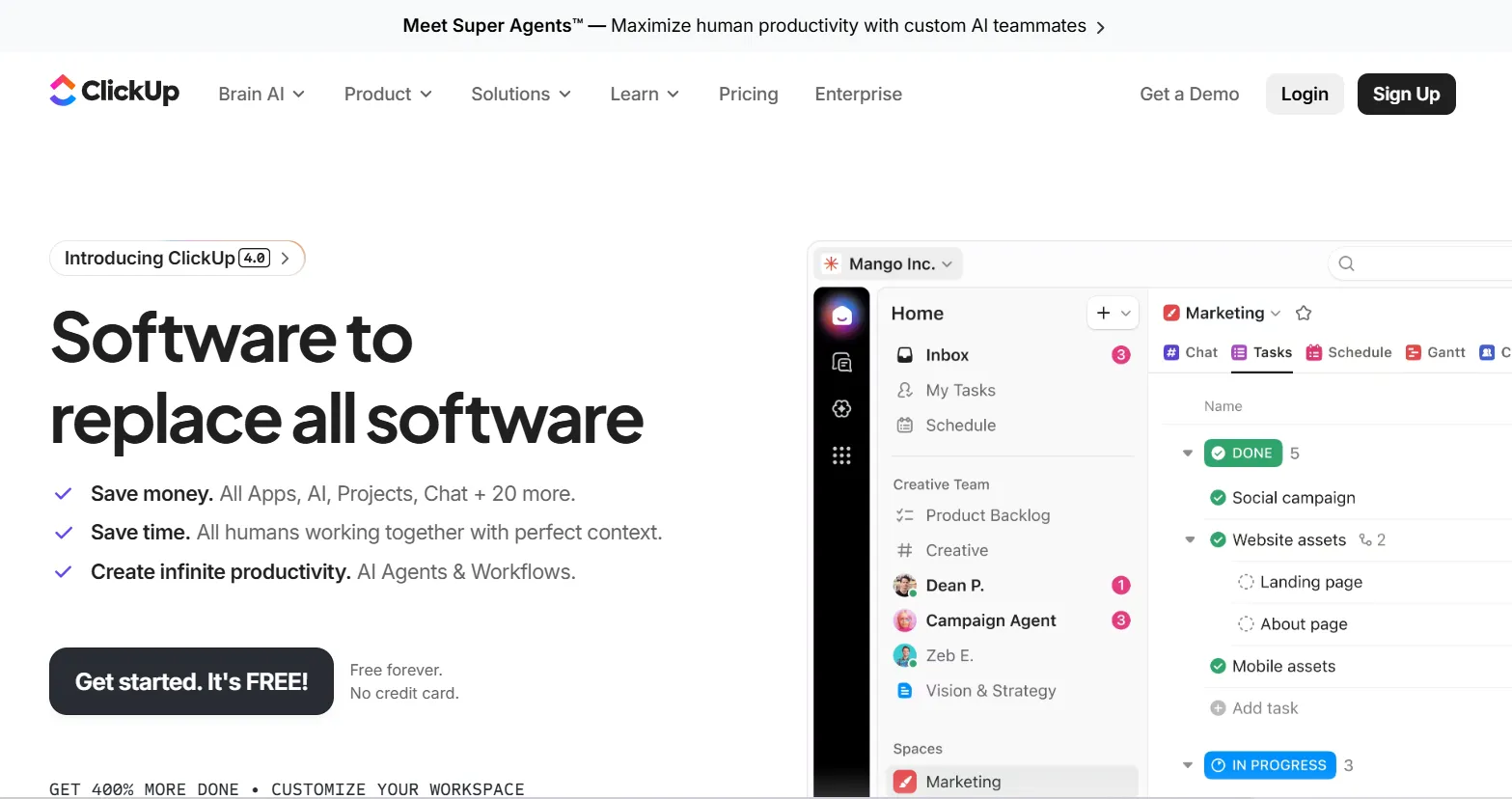
ClickUp is an all-in-one work platform, founded in 2017 by Zeb Evans in San Diego. It positions itself as "software to replace all software," bundling project management, docs, chat, whiteboards, time tracking, and dashboards into one workspace instead of separate apps.
The company says it's used by 5+ million teams, including 85% of Fortune 500 companies, and holds a 4.7/5 rating on G2 from over 10,000 reviews. Over the past year, ClickUp has pushed hard into AI with Brain, Brain², and Super Agents, AI features that connect across your tasks, docs, and chat with memory of how you work. Notably, this AI layer is priced and sold separately from the core platform plans, not bundled into them.
The most common use case is replacing a scattered mix of tools, a task list here, a doc there, a separate time tracker, a separate chat app, with one connected workspace. A solo founder tracks client deliverables as tasks, writes proposals in Docs, and chats with a contractor, all inside the same platform.
ClickUp Brain, the AI layer, can answer questions using context from your actual tasks and docs, draft content in your established tone, and summarize a project's status without you compiling it manually. Super Agents go further, working autonomously on defined workflows, like triaging incoming requests or drafting a project brief from a voice note, largely in the background.
A consultant managing multiple clients uses custom Spaces per client, with time tracking built in so billable hours are captured automatically rather than reconstructed at invoice time.
Tasks, docs, chat, whiteboards, and time tracking live in one connected system instead of separate tools, with context (like a task's comment history) visible from wherever you're working.
An AI assistant with access to your workspace's actual tasks, docs, and chat context, able to answer questions, draft content, and summarize project status grounded in your real work, not generic prompts. Sold as a separate add-on starting at $9/user/month.
Autonomous AI agents that work on defined tasks in the background, like an Intake Agent standardizing project kickoffs or a Triage Agent prioritizing incoming bugs, with less manual prompting required than a standard chat assistant.
Nearly every part of the platform (tasks, dashboards, automations) can be reshaped with custom fields, statuses, and views, letting a solo founder build a system that matches how they actually work rather than a fixed template.
A separate, metered credit pool that powers Agents, Automations, AI Fields, and image generation beyond the flat monthly AI subscription, billed at roughly $0.001-$10 per 10,000 credits depending on volume.
Solo founders managing multiple clients or projects who want tasks, docs, and time tracking connected in one place instead of scattered across separate apps.
A solo founder who just wants a simple to-do list without a learning curve. ClickUp's depth and customization options are a genuine strength for complex work and a genuine source of setup friction for someone who wants something simple on day one.
Unlimited tasks (all plans), Spaces, Lists, Folders, custom views (List, Board, Calendar, Gantt, Table, Mind Map), Docs and Wikis, Whiteboards, Chat, in-app video (Clips)
Sprints and sprint points, dependencies, multiple assignees, checklists, goals and portfolios, resource and workload management, custom statuses and task types
Native time tracking, timesheets and approvals, advanced reporting and dashboards (Business and up), billable time reports
5 active rules and 100 executions/month (Free) up to 250,000 executions/month (Enterprise), webhooks, email and SMS-triggered automations (Business and up)
Brain AI ($9/user/month): unlimited Brain Assistant, @Brain Agent, AI chat across Claude/ChatGPT/Gemini, AI writing. Everything AI ($28/user/month): adds unlimited AI Notetaker, image generation, AI Fields, AI-powered automations and dashboards, 3x Super Agent usage
SOC 2 Type II, ISO 27001, GDPR, HIPAA (available on Enterprise), SSO (Google on Business, SAML/SCIM on Enterprise), audit logs (Enterprise)
Free Forever: 60MB storage, unlimited tasks, unlimited free plan members, 5 Spaces, collaborative Docs, Kanban boards, sprint management, calendar view, 24/7 support, 1 form. AI features available on a limited trial basis only.
Unlimited — $10/user/month (monthly) / $7/user/month (billed yearly): Unlimited Spaces, Folders, Forms, Gantt charts, integrations, storage, and custom fields, plus native time tracking, goals, resource management, and ClickUp Chat.
Business — $19/user/month (monthly) / $12/user/month (billed yearly), marked "Popular": Everything in Unlimited, plus unlimited dashboards, unlimited message history, webhooks, 5,000 automation executions/month, mind mapping, private whiteboards, and Google SSO.
Enterprise: Custom pricing. Adds unlimited custom roles, SAML SSO and SCIM, audit logs, 250,000 automation executions/month, HIPAA availability, and a dedicated Customer Success Manager.
AI Add-On (Separate From the Plans Above):
Brain AI — $9/user/month: Unlimited Brain Assistant and @Brain Agent, unlimited AI chat across Claude, ChatGPT, and Gemini, unlimited AI writing, plus 1,500 AI Super Credits/user/month.
Everything AI — $28/user/month (Recommended): Everything in Brain AI, plus unlimited AI Notetaker, unlimited image generation, unlimited AI Fields and AI-powered automations, and 5,000 AI Super Credits/user/month.
AI Super Credits: Additional metered credits beyond your plan's allowance, priced from roughly $0.001 to $10 per 10,000 credits depending on volume purchased.
Annual vs. Monthly: Base plans save up to 30% billed yearly; AI plans save up to 20% billed yearly, tracked separately.
If You Cancel: 100% money-back guarantee is advertised. Upgrading or downgrading applies to your entire Workspace, not individual members, since ClickUp bills per Workspace, not per user in isolation.
⚠️ Worth knowing: the AI features shown prominently on ClickUp's homepage are not included in the Business plan's $19/user/month price. To get full Brain AI access, add $9/user/month on top; for the full agentic suite (Everything AI), add $28/user/month on top. A solo founder wanting the complete advertised experience is realistically looking at $19-47/user/month, not the headline plan price alone.
Prices last verified August 2026. Check ClickUp's pricing page for current rates before subscribing.
A separate task or project management tool like Trello or Asana, since Projects, Sprints, and custom views cover that core function natively.
A separate time-tracking app, since native time tracking is built into the Unlimited plan and up.
A basic team chat tool for simple coordination, since ClickUp Chat is included and tied directly to tasks and docs rather than living in a separate app.
A dedicated accounting or invoicing tool. ClickUp tracks time and project profitability at a basic level, but it doesn't replace QuickBooks or FreshBooks for actual bookkeeping.
A specialized design tool like Figma or Canva. Whiteboards and Docs cover lightweight visual collaboration, not real design work.
No reviews yet. Be the first to review this tool!
Explore alternatives and similar solutions in the same category.
A flexible platform that combines the power of a database with the ease of a spreadsheet to build custom business systems.

An integrated AI suite that acts as a researcher, writer, and agent directly within your workspace.

A video messaging platform for the workplace that allows you to record and share screen and cam videos instantly.
A comprehensive financial management platform for automating accounting, invoicing, and tax tracking.
Save tools to your account.
