The AI-powered workspace that replaces scattered notes, tasks, and CRMs.
6.5/10 Most powerful solo knowledge workspace available, but the first week costs before it pays.
Best for: Solo founders running 5+ client meetings weekly with complex cross-project notes
Strongest at: Meeting agent saves 30 minutes per call, auto-links notes to client records
Main limitation: 5 Supertag cap on free plan blocks testing the core feature
Compared to: Notion Free covers basic knowledge management at no cost and no learning curve
Try this first: Watch one Supertags tutorial before capturing your next client meeting
Tana's meeting agent is the clearest ROI in the product. It transcribes, summarizes, and links action items to your client records automatically in under 7 minutes post-call.
The 6.5 reflects a genuine tension. The free plan's 5 Supertag cap means you can't test the core feature without paying first, and ease of learning scores 40%.
Start on Plus at $10/month, invest a focused half-day on setup, and don't judge the tool until week two.
Skip Tana if you just need a simple to-do list or basic note app. Notion, Apple Notes, or Google Docs will serve you better without the setup cost.
Skip it if you're doing fewer than 3-4 client calls per week. The meeting agent is the strongest ROI this tool delivers. Without regular meetings, Tana becomes a premium-priced note tool with a steep learning curve and no obvious advantage over cheaper options.
Skip it if you're not ready to invest setup time. This is not a tool you open and figure out in an afternoon. If you're currently overwhelmed, adding Tana will make things worse before they get better. Come back in a quieter period.
Skip it if budget is tight and you're unsure you'll stick with it. You can't properly test the tool on the free plan. That means paying real money before you've proven the fit. Notion Free covers basic knowledge management at no cost while you decide.
Every other productivity tool makes you decide where information goes before you write it. Tana flips that. You write first, tag later, and the tool builds the structure around what you wrote. For solo founders managing clients, projects, meetings, and ideas that all intersect constantly, that's a meaningful difference.
Tana feels like a codebase for your thinking. That's a compliment and a warning at the same time.
Once you have Supertags set up, the workspace becomes self-organizing. You write a meeting note, tag the client's name as a person and the deliverable as a project, and both records update automatically. No copy-pasting. No filing. The information goes where it belongs because you told the system what it is, once.
Before you get there, Tana feels abstract and slightly overwhelming. The interface is clean but the mental model behind it requires a genuine shift. You're not learning where buttons are. You're learning a different way to think about information.
Day-to-day rhythm once the system is running: open your daily note in the morning, review Search Nodes for open tasks and this week's meetings, capture throughout the day in plain text, and let Supertags do the filing. For knowledge-heavy solo founders, this becomes genuinely low-friction after the first two weeks.
Supertags This is the feature that makes Tana different from everything else. Tag any bullet as #client and it instantly has fields: company, status, linked projects, last meeting date. The record builds itself out of what you already wrote. The limitation is the setup investment. Building a Supertag system that matches how you actually work takes time and iteration. Templates from the community help significantly.
AI Meeting Agent Records system audio without a bot in the call. Transcribes, summarizes, and extracts action items. Links the output to your existing project and client nodes automatically. This is where Tana earns its keep for meeting-heavy founders. The summary quality is consistently solid. Action item extraction is good but occasionally misses items buried in long conversations. Review it after the meeting rather than trusting it blindly.
Search Nodes Live queries that embed in your workspace and update automatically. A Search Node for "all action items tagged to this client, not yet completed" takes two minutes to build and saves you 10 minutes of manual review every week after that. The more structured your Supertag setup, the more powerful Search Nodes become. They compound over time.
The credit cliff is real and comes faster than you expect. Eight meetings on Plus sounds like enough until you have a busy week with a client sprint and hit the limit mid-month. The only way to continue using AI features is to top up (paid) or wait for the month to reset.
The mobile app is not a full workspace. Multiple App Store reviewers describe it as a "glorified voice recorder." Tana has been improving this since 2025 and added basic editing and field support, but if you expect to do meaningful workspace management from a phone or iPad, you will be frustrated. This is a desktop-first tool.
Visual customization is limited. You can add banners and text colors but the visual layer is basic compared to what the tool can do structurally. For users who rely on visual cues to navigate their workspace, this is a real limitation.
Offline mode only works for personal workspaces. Shared workspaces require an internet connection. On a train or plane without wifi, your shared workspace is inaccessible.
Plus (2,000 credits) is fine if you use the meeting agent a few times a week. Daily heavy use across meetings, voice memos, and AI chat will exhaust it in 2-3 weeks. At that point you're choosing between topping up credits or upgrading to Pro.
Pro (5,000 credits) is sustainable for most solo founders at full daily use. The ceiling feels distant on Pro unless you're running very long meetings or doing significant AI image generation.
The workspace node limit (20,000 on Free) is generous. Active daily users report reaching it after 12-18 months of regular use. Not an immediate concern on any paid plan.
The task: Turn a 30-minute client strategy call into structured meeting notes, linked action items, and an updated client record.
Without Tana: 30-45 minutes of manual work after the call.
Step 1 (before the call, 1 min): Open Tana. Create a new node in your daily note. Tag it as #meeting. Calendar sync pulls in the event details automatically if Google Calendar is connected.
Step 2 (during the call): Tana records system audio in the background. No setup, no bot, no asking the client's permission.
Step 3 (after the call, 3 min): Open the meeting node. AI has already generated a summary and extracted action items. Review both.
The summary is usually 90% correct. Occasionally an action item buried in a long exchange is missed. Scan and add anything missing.
Step 4 (2 min): The client's name in the meeting notes is tagged as a #person. Click it. Their record now shows this meeting in their history automatically. No manual linking.
Step 5 (1 min): Tag each action item as a #task with a due date. They appear instantly in your Search Node for open tasks.
Total time: roughly 6-7 minutes post-call. Manual version: 30-45 minutes.
One honest note: this workflow requires an already-built Supertag system. In week one, this same process would take 20-30 minutes as you figure out the tagging structure. The efficiency is real but it's earned, not instant.
On Plus at $10/month: Tana costs roughly 7-8 minutes at a $75/hour rate per month. If the meeting agent saves 30 minutes per meeting and you have 2 client calls per week, you recover the cost in one meeting.
On Pro at $18/month: break-even is roughly 15 minutes of recovered time per month. At 8-10 meetings per month with 30-minute savings each, ROI is clear by week two.
Where the math gets complicated: the setup investment. The first 3-5 hours of building your Supertag system cost time, not save it.
Factor that into your calculation.
Month one looks expensive.
Month two is where the returns start.
The ROI case is weakest if: you're using Tana primarily as a note-taking tool without the meeting agent, or if your work is mostly task-execution rather than knowledge-management.
Tana has three plans. Which one you need depends almost entirely on how many meetings you record per month.
Free: $0/month. 500 AI credits, 5 Supertag limit, 2 workspaces. No Google Calendar sync, no Command Nodes, no integrations. The 5 Supertag cap makes it impossible to properly test the core feature.
Plus: $10/month ($8/month billed annually at $96/year). 2,000 AI credits per month, covers roughly 8 x 30-minute meetings. Unlocks unlimited Supertags, Google Calendar sync, Command Nodes, Readwise integration, and the ability to top up credits. This is where most solo founders start.
Pro: $18/month ($14/month billed annually at $168/year). 5,000 AI credits per month, covers roughly 22 x 30-minute meetings or 25 hours of live transcription. Adds advanced model selection and password-protected published pages.
The plan you actually need: Start on Plus. If you record more than 8 meetings per month, budget for Pro at $18. Know that going in.
Annual vs monthly: 22% savings on annual. Start monthly until you're sure the tool fits.
Price history: Stable since the 2024 public launch. Tana raised $25M in early 2025. VC-backed tools carry pricing risk as growth targets increase. Nothing alarming yet, but worth watching.
If you cancel: Notes stay readable on the free plan. Integrations and paid features stop. Full export to JSON and Markdown is available but is not a clean migration. Supertag schemas and Command Nodes do not transfer to other tools.
Student and NGO discount: 50% off. Plus drops to $5/month, Pro to $9/month. Email help@tana.inc with proof. Prices verified March 2026.
Sign-up takes under two minutes. Then the difficulty starts.
The first screen is a blank outliner with a daily note. No guided setup, no wizard, no template that loads your first Supertag and shows you what the fuss is about.
The magic moment, when you apply a Supertag and watch a bullet become a structured object with custom fields, typically happens in tutorial session two or three, not on day one.
Time to first useful output: roughly 90 minutes if you watch one good tutorial first. Without a tutorial, most users spend that time poking around and feeling like they're missing something.
The interface is clean, minimal, and fast. No cluttered toolbars. No visual noise. Everything lives in the outline and the system gets out of your way once you learn how to navigate it.
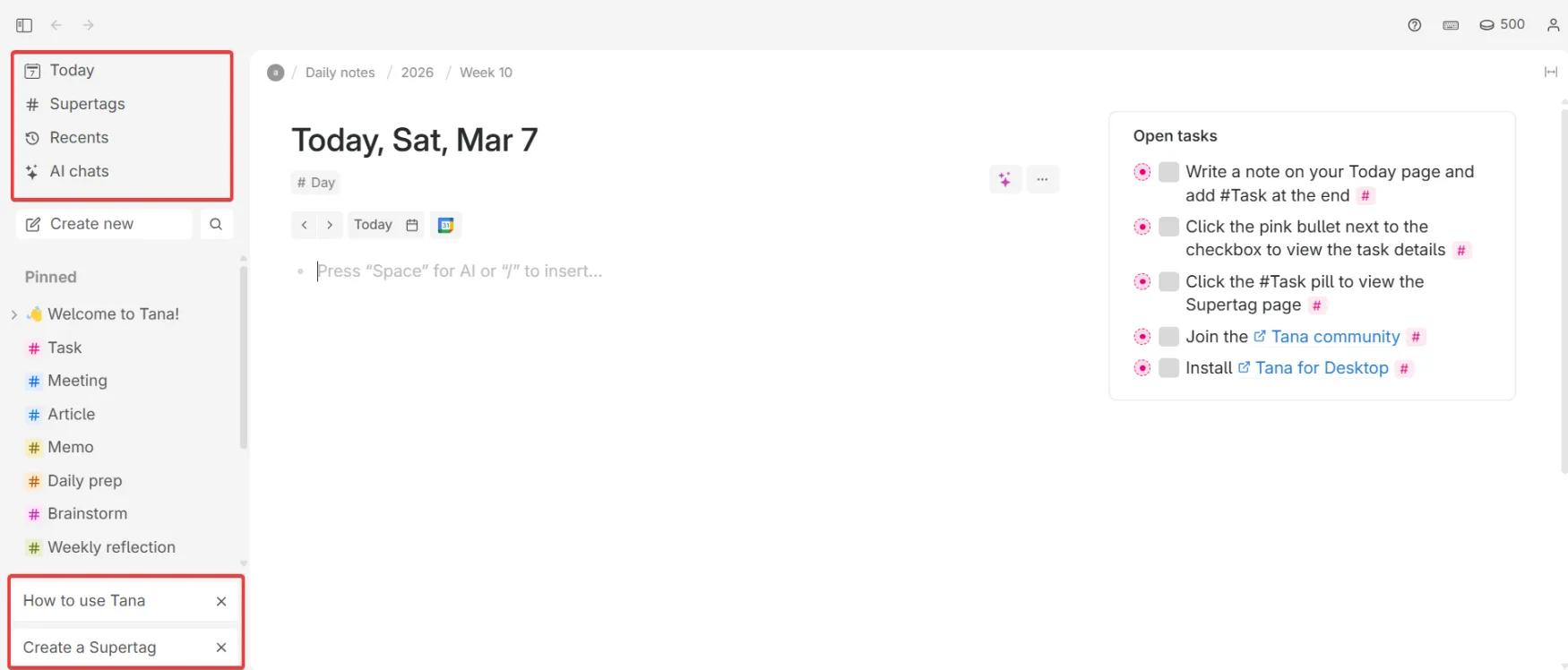
The left sidebar has four fixed items at the top: Today, Supertags, Recents, and AI chats. Below that is a pinned section where your most-used Supertags sit for quick access.
At the very bottom of the sidebar, two tutorial shortcuts are permanently visible: How to use Tana and Create a Supertag. These are not temporary onboarding prompts.
They stay there. Any time you get stuck you are one click away from the relevant guide without hunting through settings or help docs.
This is a small detail that makes a real difference for new users.
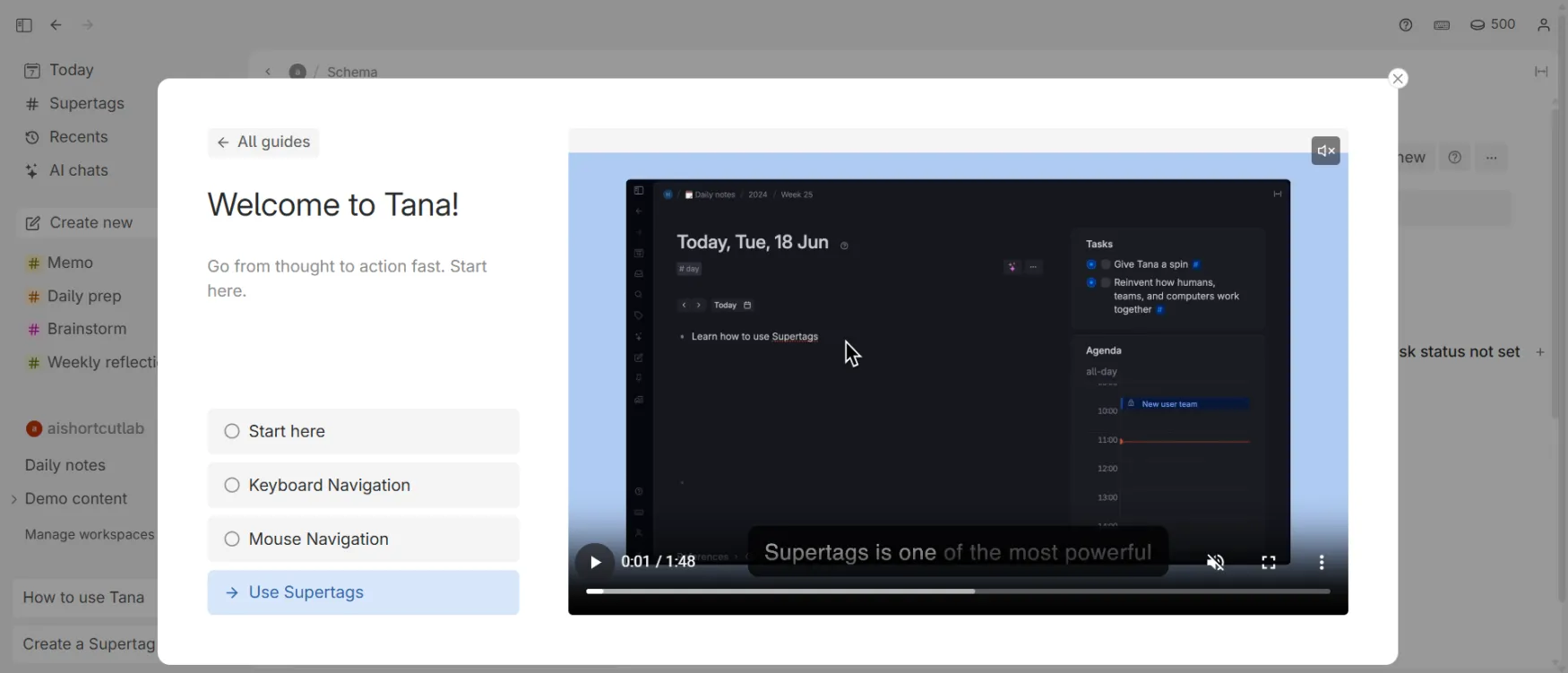
When you click how to use Tana a modal opens with a short video guide. It has four sections: Start here, Keyboard Navigation, Mouse Navigation, and Use Supertags.
The videos cover the basics in under two minutes.
The placement is good. The content is relevant. One thing worth knowing: Use Supertags is the last section in the sequence and Supertags are the feature that makes Tana click. Users who ignore the modal early, which many do, miss the most important part of the guide.
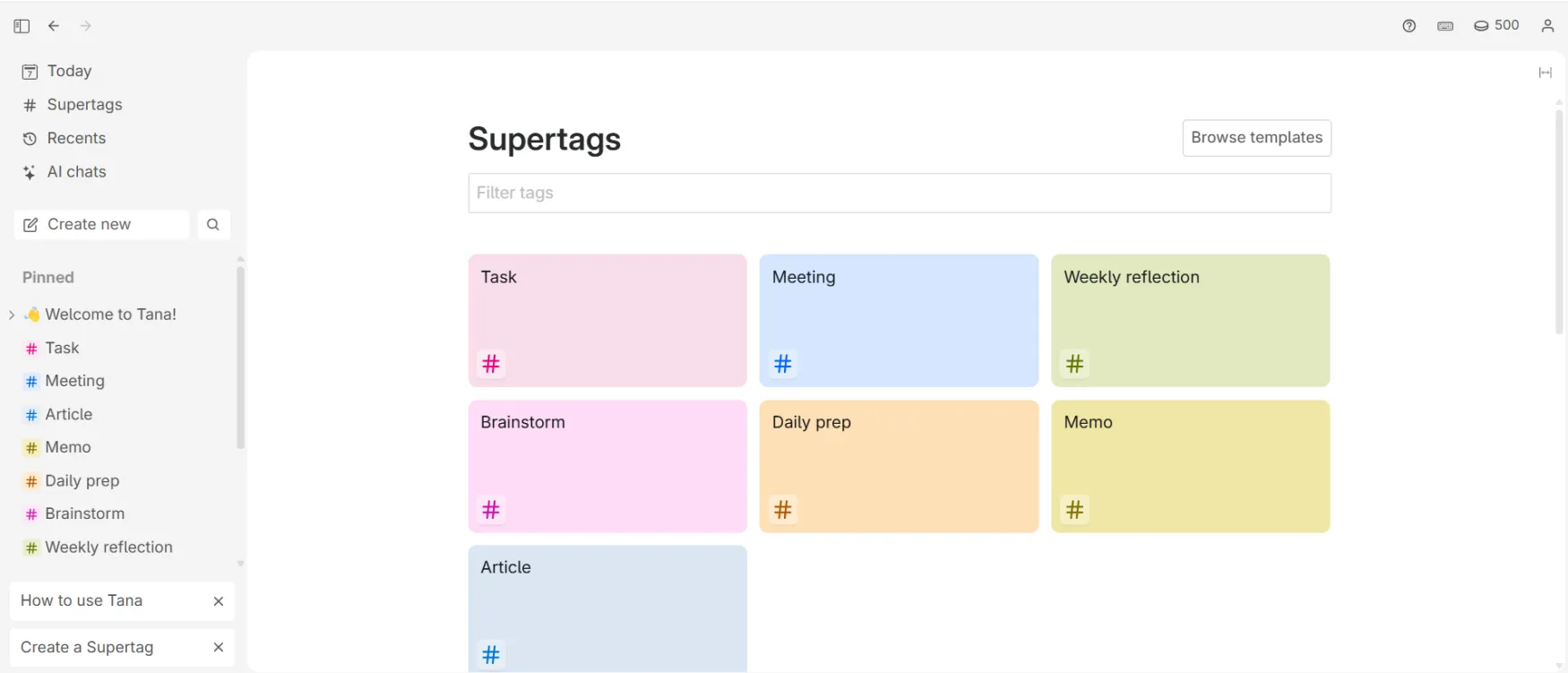
Clicking Supertags in the sidebar opens a visual grid of all your tags as color-coded cards. Task is pink, Meeting is blue, Weekly reflection is green, Brainstorm is purple, Daily prep is orange, Memo is yellow. Each card shows the name and the hash icon.
This view makes your whole system visible at a glance. There is also a Browse Templates button in the top right for users who want to import community-built Supertag structures instead of building from scratch, which is the faster starting point for most people.
| Feature | Rating | Details |
|---|---|---|
| Supertags |
|
The strongest implementation of structured notes in any PKM tool. More flexible than Notion databases. |
| AI Meeting Agent |
|
Excellent transcription and summaries. Action item extraction occasionally misses items buried in long conversations. |
| Search Nodes |
|
Live queries that compound in value the more you use the system. Set once, always current. |
| Voice Memos |
|
Works exactly as described in 60+ languages. Mobile editing is the gap. |
| Command Nodes |
|
Genuinely powerful once built. Require real setup time and a paid plan. |
| Mobile App |
|
Capture is fast and clean. Workspace management is desktop-only. Android rating 3.1/5 as of early 2026. |
| Visual Design |
|
Clean and functional. Limited visual customization compared to Notion. |
| Data Export |
|
JSON and Markdown export works. Migrating out is a real project, not a quick action. |
Free and Plus plans: email only at help@tana.inc. No live chat. No phone. Reported response time is 24-48 hours for general queries.
Pro plan: priority support is listed as a feature. Specific response time targets are not publicly stated.
Community support: the Slack community is where most support actually happens. The Tana team is active and responds directly.
Community members known as Tana Navigators fill most gaps. For common questions, Slack is faster than official support.
Documentation: official docs at help.tana.inc are solid for core features. Community resources (Tana Deconstructed newsletter, YouTube tutorials) cover advanced use cases better than official docs. Reliability: no significant outages reported in the past 12 months. Regular updates via changelog. Some unannounced UI changes have caught users off guard but no major feature removals.
The Tana Slack community has 21,000+ members as of 2026 and is one of the most active in the PKM space.
Recurring praise across Product Hunt, Slack, and independent reviews: Supertags are consistently described as genuinely different from every other tagging or database system.
Users who have tried Notion, Roam, Logseq, Obsidian, and Evernote say Tana is the first tool that didn't force them to fight the structure.
Recurring complaints: steep learning curve before value, mobile app too limited for real workspace use, free plan not sufficient to evaluate the tool fairly, and difficulty leaving once you've built a system inside it.
One pattern worth noting: the most enthusiastic users also tend to be the most experienced with PKM. Users coming from Notion without strong PKM backgrounds have a higher dropout rate.
Android App Store rating: 3.1/5 as of early 2026. Mobile experience complaints dominate recent Android reviews.
Your notes in plain text come out cleanly in Markdown. If all you want is your written content, the export is fine. The problem is everything structural. Your Supertag schemas, your Search Node queries, your Command Nodes, your linked relationships between clients and projects and meetings. None of that translates. You get a folder of text files, not a working system. The more sophisticated your setup, the more you're leaving behind. This is the most honest reason to not over-engineer your Tana system until you're sure you're staying.