
YouMind lets you save anything you find online, then use AI to turn that pile of sources into a finished piece of writing without switching tools.
6.9/10 Best research-to-draft pipeline available, but the alpha extension and undocumented export are real concerns.
Best for: Solo content creators publishing weekly from video, podcast, and article sources
Strongest at: Video-to-blog workflow, 45-minute podcast to edited draft in under 45 minutes
Main limitation: Chrome extension is alpha v0.3.0, data export policy is undocumented
Compared to: Notion AI at $20/month covers writing with better reliability and documented export
Try this first: Save 5 sources into a Board on free, run the AI Writer once
The Board system is what makes YouMind different. The AI maintains context across all saved sources, not just one file at a time. A 45-minute podcast becomes an edited 1,000-word draft in roughly 42 minutes once the workflow is running.
Three things hold the score below 7. The Chrome extension is version 0.3.0-alpha23 and sits in a critical daily workflow position. Performance degrades on larger boards with heavy media. Data export is completely undocumented, which matters before you store meaningful research inside the tool.
Test the free plan on a real project before paying. If the Board workflow clicks and the extension holds up on your typical pages, Pro at $20/month earns its cost within the first month.
Skip YouMind if you need a general-purpose AI assistant. YouMind is built around saving sources into a Board and writing from within that project context. If you want to chat with AI, ask questions, or generate content without a research workflow, ChatGPT or Claude are faster and require no setup.
Skip it if your projects involve a large volume of sources and complex drafts. Multiple users report that YouMind slows down noticeably on larger boards with heavy media. One Product Hunt reviewer specifically called out sluggishness on larger projects with tons of media and complex drafts. If your typical project involves 50 or more sources, test the free plan carefully before committing to Pro.
Skip it if you need offline access. YouMind requires an internet connection for essentially all features. There is no offline mode. If you work frequently in low-connectivity environments, this is a genuine blocker.
Skip it if you are evaluating it purely as a note-taking tool. Notion Free, Obsidian, or Apple Notes handle basic note-taking at lower cost and lower complexity. YouMind earns its value through the collection-to-creation pipeline, not as a passive note store.
Most content creators and researchers have the same problem. Their sources live in five different places: a browser tab graveyard, a Readwise collection they rarely open, a Notion page that is two months out of date, a YouTube playlist, and a folder of PDFs they downloaded with good intentions.
YouMind was built to end the tab graveyard. The insight behind the product is that creation and collection should happen in the same space. When your research and your draft live in the same Board, you stop losing context when you switch from reading to writing.
The Feynman Learning Method is cited explicitly in the company's philosophy: you learn better by creating from what you consume, not just by consuming it. YouMind is designed to make that creation step feel like a natural continuation of the research step rather than a separate, harder thing.
Using YouMind day-to-day feels lighter than the feature count suggests. The interface is clean. Navigation between materials, AI chat, and the editor is smooth. Everything needed for a project is visible from the Board view without hunting through a sidebar hierarchy.
The workflow has a real rhythm once it clicks. Save sources during the week. Open the Board when you are ready to write. Ask the AI to synthesize across your materials. Use the AI Writer to build a first draft from that synthesis. Edit the draft in the same document, in the same window. Publish or share with one click.
The roughness shows at scale. Users report noticeable loading delays on boards with large amounts of media. The AI chat context window has limits that become apparent on very large projects. These are solvable early-stage problems, but they are real daily friction points at the Pro level.
Boards. The strongest feature in the product. Each Board is a project container that holds materials, annotations, AI summaries, chat history, and draft documents. The AI maintains context across everything in the Board, which means you can ask "what do all my saved sources agree on?" and get a synthesized answer rather than a response limited to one document. The intelligence of Board answers improves as you add more and better-annotated sources. Boards are what makes YouMind different from a chat tool with file uploads.
Skills. Pre-built specialized agents you apply to a Board's materials. The library includes agents for social content creation, YouTube script workflows, language learning, business planning, and content planning. In testing, applying the social content Skill to a Board of saved articles produced usable LinkedIn post drafts in roughly three minutes. The output required editing but was a functional starting point. The value of Skills depends entirely on how relevant the available agents are to your specific workflow. The library is useful for the core creator use cases and thin everywhere else.
Chrome Extension. This is the capture step that feeds everything else, which makes its alpha status worth noting. In testing on standard web pages and YouTube videos, the extension performed well. The instant AI summary on save is genuinely useful. When saving complex PDFs or pages with significant JavaScript, occasional failures required a manual retry. For a tool whose entire value proposition depends on frictionless capture, the alpha label on the extension deserves your attention before you build a daily habit around it.
Performance on large boards is the biggest undocumented risk. YouMind markets itself as a home for all your research. The reality is that very large boards become slow. This creates a tension: the more you use the tool as intended, the more it degrades. Heavy users will feel this before they hit the Pro credit ceiling.
No offline mode at all. Every feature, including reading materials you have already saved, requires an internet connection. This is not a minor limitation. It is a complete dependency that affects any workflow involving travel or unreliable connectivity.
Alpha Chrome extension in a critical workflow. The extension is version 0.3.0-alpha23. The alpha label is honest but it means instability is possible. If the capture step breaks, the whole pipeline stalls. Test thoroughly before depending on it daily.
Data portability is undocumented. There is no help center article on export. There is no mention of what format your boards and drafts export to. For a tool asking you to build your research workflows inside it, this is a real gap. Verify before committing meaningful work.
On the free plan: 2,000 credits per month. For a light user running a single project and writing one to two pieces of content per month, this is workable. For a content creator publishing weekly and using the AI Writer regularly, the free plan ceiling arrives within two weeks.
On the Pro plan: 20,000 credits per month. For most solo content creators producing four to eight pieces of content per month, Pro covers normal daily use without hitting the ceiling. Heavy users who run large research synthesis tasks or use image and audio generation regularly will want to watch the credit count.
What credit usage actually looks like: Saving a YouTube video and generating a summary costs credits. Running the AI Writer for a 1,000-word draft costs credits. Applying a Skill to a board costs credits. There is no published credit cost per action on the pricing page. You discover usage rates by using the tool, which makes budgeting difficult before you have established your workflow.
Turning a 45-minute podcast episode into a published blog post.
Without YouMind, this process involves: listening or watching, taking notes separately, opening a writing app, and assembling a draft while flipping between sources. Total time: 90 minutes to two hours for a 1,000-word post.
Step 1 (2 min): Open YouMind, open an existing Board for the topic, paste the podcast URL. The extension saves it and generates an AI summary automatically.
Step 2 (5 min): Read the AI summary, add two to three highlights and annotations to mark the specific points relevant to your angle. The AI will use your annotations to understand which parts matter to you.
Step 3 (5 min): Open the AI chat for the Board. Ask it to identify the three strongest arguments across your saved sources that support your specific angle. It searches across all materials in the Board, not just the podcast.
Step 4 (10 min): Run the AI Writer with a simple prompt: "Write a 900-word blog post using the three arguments from our chat, in a direct, practical tone for solo founders." The draft arrives in approximately 90 seconds.
Step 5 (20 min): Edit the draft. Replace generic transitions with specific examples from your own experience. Cut two sections that are not relevant. Add a concrete opening sentence.
Total time: approximately 42 minutes. The finished piece required real editing, but it arrived at the editing stage in under half the normal time.
Honest note: This timing assumes a Board that already has two to three prior sources in it. A cold Board with only the single podcast episode produces a thinner draft. The tool compounds in value as the Board fills with relevant sources.
At $20/month for the Pro plan, YouMind costs the equivalent of roughly 16 minutes at a $75/hour rate. If it saves you one hour per month on research and drafting, the ROI is clear before the first billing cycle renews.
Where the savings actually come from:
Video and podcast repurposing is the clearest time save. A 45-minute podcast episode to 1,000-word blog post typically takes 90 to 120 minutes manually. In YouMind, the same task runs in 40 to 50 minutes including editing. If you produce one content piece per week from existing source material, that is roughly two to three hours recovered per month on this use case alone.
Research synthesis is the second saving. Spending 20 minutes asking YouMind to synthesize across eight saved sources replaces 60 to 90 minutes of rereading, note-comparing, and manual synthesis. For consultants or researchers producing client deliverables, this compresses frequently.
The ROI case is weakest if: you are using YouMind primarily as a note-taking tool without the AI Writer and Skills features. In that case, Notion Free or Readwise at lower cost cover the storage use case.
The ROI case is strongest if: you publish written content at least weekly, you regularly consume source material (videos, podcasts, articles) before writing, and you are currently wasting time moving between a research tool and a writing tool.
YouMind has three plans. Prices are per month. No annual billing information is confirmed on the desktop site. The iOS App Store lists a Pro Yearly option at $249.99 per year, which works out to approximately $20.83 per month.
Free: $0/month. 2,000 AI credits per month, up to 100 saved materials, limited AI model access. No credit card required. This is a genuinely functional test of the workflow, not a teaser. 2,000 credits covers real daily use for a light user across a small project.
Pro: $20/month. 20,000 AI credits per month, unlimited AI model access across all available models, unlimited saved materials, unlimited file uploads and parsing, unlimited AI writing, image creation, and audio generation, higher memory and context window. This is the plan that removes the ceiling.
Max: $100/month. 200,000 AI credits per month, maximum and faster AI writing, maximum image and audio generation, maximum memory and context, advanced customization, and early access to new features. The jump from $20 to $100 is steep with nothing in between. Heavy users who hit the Pro credit ceiling have no gradual upgrade path.
Annual vs. monthly: A Pro Yearly plan is available on iOS at $249.99 per year, saving roughly $10 compared to 12 months of monthly billing. Annual billing is not clearly surfaced on the web pricing page at time of writing.
Price history: YouMind is an early-stage product. A 30% holiday discount ran in late 2025. No significant pricing changes documented yet, but early-stage tools at this price point should be treated as subject to change as the product scales.
If you cancel: Data export and portability options are not documented on the site or in the help center at time of writing. Before building large research projects inside YouMind, contact the team directly at contact@youmind.ai to ask about export. This is a real gap for a tool asking you to store meaningful research.
Pricing confirmed from official site and iOS App Store, verified March 2026.
Sign-up takes under two minutes. No credit card required. You land in a workspace with a list of example Board.
Creating a Board is the first meaningful step and it works well. You name the project, optionally describe what it is about, and YouMind immediately suggests relevant sources it can pull in. This is a stronger cold-start experience than most tools in this category. You have something to work with before you have saved a single thing yourself.
The Browser Extension is where the daily capture habit lives. The Chrome extension (version 0.3.0-alpha23, updated February 2026) adds a one-click save to any page with an instant AI summary. It is in alpha, which is worth knowing. In testing it performed reliably on standard web pages and YouTube. PDF capture required slightly more patience.
The iOS App is available on the App Store. Mobile capture via the Share Sheet is described by users as seamless. The mobile app is best treated as a capture companion. Complex board management and drafting is a desktop workflow.
Where the system clicks: Most users describe a moment, usually in the second session, when the Board structure starts making sense. Before that moment the tool feels like a note app with extra steps. After it, the research-to-draft flow becomes natural.
The interface is clean, minimal, and well-organized. Switching between materials, AI chat, and the editor is fast and requires no hunting. Navigation between these three modes is the core daily action and it works well.
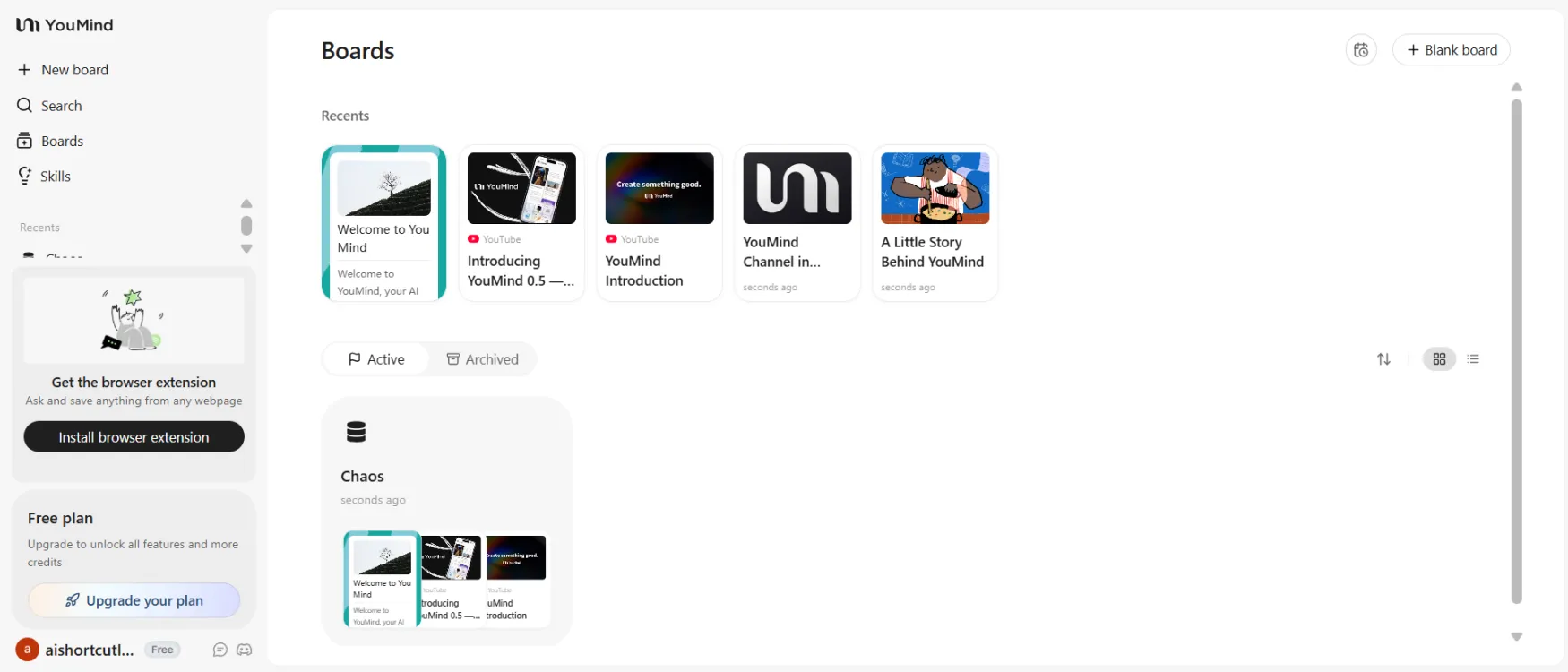
Everything for a project lives in one Board view. Materials on the left, AI chat in the center, editor accessible from the same screen. The layout earns its design-focused reputation.
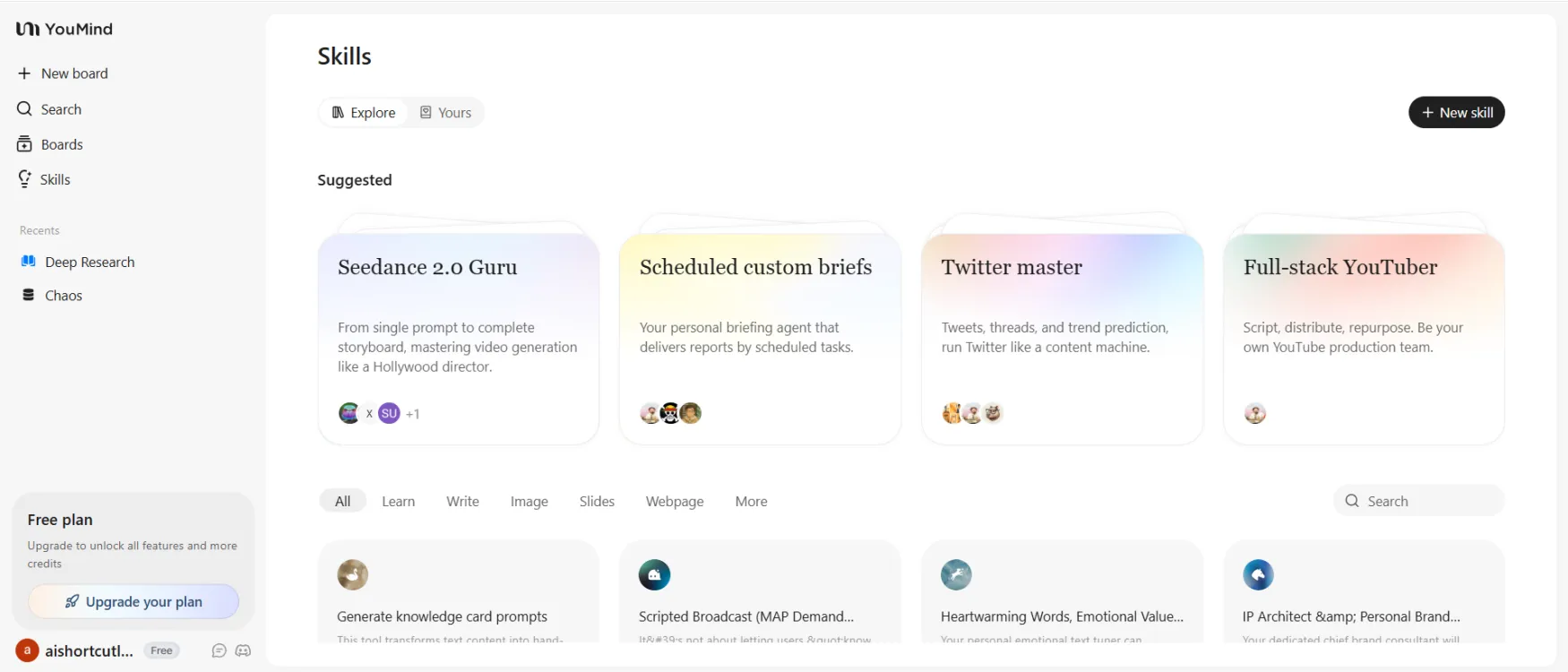
Skills are pre-built AI agents for specific tasks. The library covers core creator use cases. Applying a Skill takes one click. The gap is depth: there are not enough Skills for non-content workflows yet.
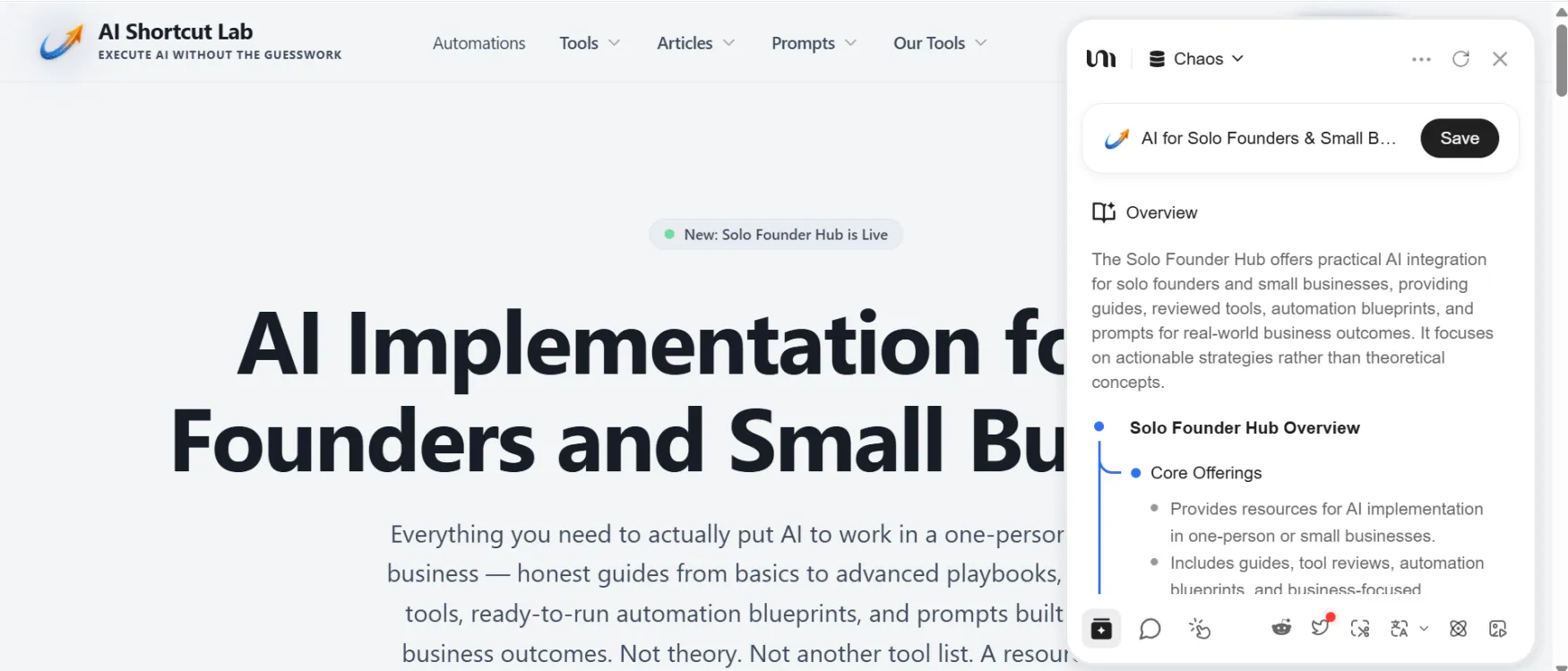
The extension generates a summary on save. Fast and useful when it works. Alpha status means occasional failures on complex pages. Worth testing before making this a daily capture habit.
The one consistent friction point is performance on heavier boards. The interface is fast for light projects. For boards with 20 or more media-heavy sources, loading times introduce real daily friction. This is the gap between the experience the design promises and the experience power users actually have.
| Feature | Rating | Details |
|---|---|---|
| Boards |
|
The strongest feature in the product. Context is maintained across all materials in a Board. Output quality improves as you add more annotated sources. |
| AI Writer |
|
Fully editable document output grounded in your Board materials. Requires editing but produces useful first drafts. Better output with more annotated sources. |
| Multi-Model Selection |
|
Access to OpenAI, Anthropic, Google, DeepSeek, and Meta within the same workspace. Model switching available per task on Pro. Free plan limits this to a subset. |
| Skills Library |
|
Useful for core creator workflows. Thin for anything outside content creation and research. Needs more depth to cover a wider range of solo founder use cases. |
| Chrome Extension |
|
Alpha version 0.3.0-alpha23. Works well on standard pages and YouTube. Occasional failures on complex PDFs. Alpha label is a real reliability risk for a daily capture habit. |
| iOS App |
|
Capture via Share Sheet is seamless. Complex board management and drafting is a desktop workflow. |
| Slides and Smart Video |
|
Functional for simple narrated presentations. Not a professional video production tool. Smart Video is a one-click narrated export, not a full editor. |
| Performance on Large Boards |
|
Documented loading issues on large boards with heavy media. The most significant daily friction point for power users. |
YouMind's primary support channel is email at contact@youmind.ai. There is no published response time target. No live chat is available on any plan.
Community support exists on Discord. The CEO Frank is documented as active on Product Hunt and in the Discord. For an early-stage product, founder-level community engagement is a real support asset, but it is not a substitute for documented support SLAs.
The help center at youmind.com is present but sparse. Key topics, including data export, credit usage rates per action, and cancellation terms, are not covered as of March 2026. These are gaps that matter for a solo founder making a real workflow commitment.
No significant outages are documented in available sources. The Chrome extension has an update history showing active development through February 2026, which is a positive signal for a tool still in alpha.
The most honest summary: support is founder-responsive but not structured. For a daily-use productivity tool, this is adequate while the product is small and the team is accessible. It is worth watching as the user base grows.
YouMind was featured on Product Hunt and launched with an active Discord community. The Chrome Web Store rating is 4.3 out of 5 as of early 2026.
The consistent praise across Product Hunt, the Chrome Web Store, and third-party review directories centers on three things. The Board structure is described repeatedly as genuinely different from adding an AI chatbox onto a note-taking app. Users appreciate that the AI maintains context across all materials in a Board rather than treating each conversation as isolated. Several users who moved from Readwise and Notion describe the Board system as the first workflow where research and writing feel like one thing rather than two separate stages.
The consistent complaints are equally clear. Loading performance on large boards is the most frequently mentioned frustration. One reviewer described waiting too long to open the editor simply to view entries. The alpha status of the extension makes some users nervous about depending on it as their primary capture tool.
One user specifically stated they stopped using Perplexity after moving to YouMind, because the AI search results are tied to their project context rather than a standalone conversation. That is the most concrete head-to-head verdict from real users available at time of writing.
The absence of third-party in-depth reviews covering the 2026 feature set, specifically Skills, Slides, and Smart Video, is worth noting. These are newer additions and the real-world community evidence on them is still thin.