HeyGen generates professional videos using AI avatars, voice cloning, and multilingual dubbing. You write a script, pick an avatar, and get a finished video — no filming required.
HeyGen's core technology is the best in its class for AI avatar spokesperson video at this price. The Avatar IV model delivers. The Video Translator is a genuine differentiator with no comparable equivalent at $29/month. The text-based editor is one of the most accessible entry points to video production that exists for a non-technical solo founder.
What held the score down: Value for money scores a 5. The gap between the pricing page language and the actual plan parameters, Avatar IV caps, iteration credit costs, processing throttles is material and not disclosed upfront. Reliability and support score a 4. The 80% Trustpilot negative rate, documented mid-subscription pricing changes, and support failures on billing disputes form a consistent pattern. A tool with this quality of technology deserves a better trust track record than it has built.
What pushed the score up: Core functionality scores a 7. When the technology operates within its real parameters, it delivers reliably. Time saved scores an 8. The reduction in spokesperson video production time is the most defensible value argument in the product.
The ideal user: A solo founder, consultant, or course creator who produces spokesperson-style or multilingual video at least weekly, wants to appear on video without filming themselves, and starts on monthly billing with enough margin to absorb a plan change before committing to annual.
If HeyGen is not the right fit: Synthesia at $22/month covers the same spokesperson video use case with a more stable enterprise trust track record, though fewer features at the entry tier. VidAU covers short-form product ad creation more specifically and cheaply for e-commerce use cases.
Bottom line: Start on the free plan. Test Avatar IV quality on a real piece of your content. Upgrade to Creator monthly before annual. Track Avatar IV minutes in the first billing cycle to confirm whether Creator or Pro is your real plan.
Skip HeyGen if you need bulk video ad production for e-commerce. HeyGen is built for spokesperson-style and narrative video. It can generate product placement ads, but the workflow is not optimized for volume. VidAU's URL to Video and bulk Remix features are faster and cheaper for product ad throughput at scale.
Skip it if "unlimited" is a hard requirement for your workflow. The Creator plan uses the word "unlimited" on the pricing page. The actual Avatar IV cap is 5 minutes per month. If your workflow requires Avatar IV access beyond that without queue management and upgrade prompts, your real plan is Pro at $99/month. Evaluate the tool at that price point before committing.
Skip it if you are building a professional video editing pipeline for filmed content. HeyGen generates video from text, scripts, and images. It does not edit raw footage. If you need to incorporate AI into a filmed production workflow, CapCut at free or DaVinci Resolve at free cover that entirely.
Skip it if a billing change mid-subscription would create an operational problem. The documented pattern of pricing changes without notice is a real operational risk for a solo founder running lean. If your content delivery workflow depends on a specific feature working at a specific plan level, an undisclosed change to that feature has no easy fallback.
The barrier HeyGen removes is the camera. Specifically, it removes the camera as a production bottleneck for solo founders who need to produce video content at consistent frequency.
Filming requires setup time, a usable background, camera comfort, a decent microphone, and editing time afterward. For a solo founder producing spokesperson-style video weekly — sales outreach clips, course lessons, LinkedIn content, onboarding videos for clients — that production cycle consumes two to four hours per video. At a $75/hour valuation, a weekly video at that rate costs $150 to $300 per month in time before counting equipment or editing tools.
HeyGen removes those inputs from the equation. Write the script, select the avatar, generate. The production layer becomes invisible. Whether that time saving justifies $29 to $99/month depends entirely on how often you produce video and how much of your time the current production cycle consumes.
HeyGen is not a general-purpose video creation tool. It is a text-to-avatar video platform with a translation layer built on top. Understanding what it does versus what it does not do is where most purchasing mistakes happen.
What it does reliably: Converts written scripts into avatar-narrated video with convincing lip-sync. Generates a Digital Twin from a reference recording that can then deliver any script in the creator's likeness. Dubs existing video into other languages while preserving the original speaker's voice and timing. Connects to external AI models (Sora, Veo, Kling, ElevenLabs) for supporting visuals and audio within a single workflow.
What it does not do: Edit filmed footage. Improve weak scripts. Generate compelling content from thin inputs. Produce brand-specific or editorially distinctive video from a generic text prompt. Replace the thinking and point of view behind a message — only the delivery of it.
This distinction matters for the ICP. A solo founder who writes strong, specific scripts will get strong output. A founder who expects HeyGen to generate the insight, the narrative, and the production quality together will get generic output that requires significant editing before it is useful. HeyGen accelerates video production. It does not replace the content strategy behind it.
Digital Twin. This is the most defensible feature at every price tier. Record once, deliver any script indefinitely in your own likeness. The Avatar IV quality at Creator level is strong enough for professional use on short-form content under 3 minutes. The limitation is technical: Avatar IV access is capped at 5 minutes per month on Creator. Content beyond that length falls back to previous-generation models, and the quality difference is visible on careful inspection. For the ICP producing sub-5-minute videos, Creator is the correct tier. For anyone producing longer content or relying on Avatar IV across all output, Pro at $99/month is the real plan they need.
Video Translator. The clearest competitive differentiator in the product at any price. Upload a finished video, select target languages, and HeyGen returns dubbed versions with preserved voice tone and native lip-sync. No re-recording, no localization agency, no separate voice tool required. Output quality for well-resourced languages — Spanish, German, French, Portuguese, Japanese — is well-documented and strong. The translation minute cap is not clearly surfaced on the pricing page before purchase. Verify your monthly volume against the plan limit before committing to annual billing.
Video Agent (Text to Video). The weakest of the three for solo founder use. The Video Agent builds a video from a text description — it generates the script, selects stock visuals, adds avatar narration, and returns a finished file. For generic explainer content on widely covered topics, the output structure is usable as a first draft. For anything requiring a specific perspective, brand voice, or domain-specific insight, the output is flat. This feature produces usable structure, not compelling content. A solo founder who treats it as a finished product will get output indistinguishable from any other AI-generated explainer video. Treat it as a starting point that still needs editing, not an endpoint.
The credit consumption model is not disclosed clearly upfront. Credits are consumed on every generation attempt, including previews, iterations, and renders you don't end up using. If your workflow involves testing pacing variations, trying multiple avatar styles, or adjusting script delivery, each attempt draws from your monthly credit balance. A single polished video can consume three to five times the credits of the final generation alone.
The "unlimited" language creates a specific, documented problem. The Creator plan says "unlimited avatar videos." The Avatar IV model is capped at 5 minutes per month. Processing speed is throttled to standard tier, meaning a 5-minute video can queue for 15 to 28 minutes depending on server load. Both limits are in the pricing page footnotes, not in the headline feature descriptions. Users who build a workflow around the advertised capabilities, then discover the real parameters, account for the majority of negative reviews across platforms.
Annual plan risk is specific and documented. HeyGen has changed plan terms mid-subscription. Translation minutes described as "unlimited" were reduced to 120 per month for users on active annual contracts without advance notice. At least one user documents an unauthorized plan upgrade charge. For a solo founder, annual commitment on a subscription where feature changes can occur without warning introduces a real operational risk that monthly billing avoids.
HeyGen has a clear upgrade path for a growing solo operation. The Creator to Pro step from $29 to $99/month is logical if weekly content production is the base workflow: Pro removes the Avatar IV minute cap, speeds up processing, and adds 4K export. The price jump is meaningful but not a cliff.
The Business plan at $149/month plus $20 per seat is designed for teams, not for solo scaling. SCORM export and LMS integrations are useful for course creators specifically, but the per-seat cost structure is not relevant until a second person joins the workflow.
The real scalability constraint is not a feature ceiling — it is a trust one. Building a deep content production workflow around HeyGen, integrating it into client deliverable processes, and committing to annual billing all require trusting that plan terms will remain stable. The documented evidence suggests that trust needs to be earned month to month before it is extended annually.
For a solo founder whose video output is growing, HeyGen covers the next 12 to 24 months at Creator or Pro level without the technology becoming the limiting factor. Start monthly. Build the workflow. Evaluate annual only after the plan has operated as documented for at least two billing cycles.
Converting a 10-slide training deck into a narrated course module video.
This is the most commonly cited solo founder use case for HeyGen, specifically among course creators and consultants building self-serve client education content.
Step 1 (3 min): Import the PowerPoint file into HeyGen directly. The platform extracts the slide content and generates a rough script from the text. Review the auto-generated script and edit two slides where the AI collapsed multi-step explanations into single-sentence delivery.
Step 2 (5 min): Select the Digital Twin avatar and match it to the cloned voice. Add one pause marker on slide four where the pacing felt rushed against the visual.
Step 3 (2 min): Set output to 16:9 for the course platform. Select background music from the built-in library at low volume. Enable auto-captioning.
Step 4 (18 min): Generate at standard processing speed on the Creator plan. Queue time was 12 minutes in the first attempt and 28 minutes in the second generation of the same project on the same day. Render time was 6 minutes in both cases. The queue variability is the most operationally relevant friction point on this plan.
Step 5 (10 min): Review output. Captions are accurate. Lip-sync holds across the 8-minute video duration. One slide transition is abrupt. Re-generate that scene only.
Total time: approximately 40 minutes. The same module filmed manually would take two to three hours including setup, recording, and basic editing. The time saving is real and consistent across this use case.
Honest note: If you are working against a delivery deadline, the unpredictable queue time on Creator is a real variable. Build a buffer into your production schedule until you have enough data on your own processing times to estimate reliably.
At $29/month for the Creator plan, HeyGen costs the equivalent of approximately 23 minutes at a $75/hour freelance rate.
The clearest ROI scenario: A solo consultant or course creator producing one video per week — previously spending two to three hours filming, editing, and captioning — gets that down to 30 to 45 minutes per video. At one video per week, that is six to nine hours recovered per month. Against a $75/hour valuation, the plan justifies its cost in the first video of the month.
The ROI requires the Creator plan to actually be the plan you need. If Avatar IV quality is the standard your audience expects and 5 minutes per month is insufficient for your output volume, your real plan is Pro at $99/month. At $99/month, you need to recover approximately 80 minutes at $75/hour per month to break even. Weekly video production supports this math. Monthly or occasional production does not.
Where the ROI case is weakest: Founders producing fewer than four videos per month, or those primarily testing the Video Agent rather than the Digital Twin. For that use case, the free plan's three videos per month covers evaluation without a monthly payment commitment.
Honest bottom line: For any solo founder producing spokesperson, training, or thought leadership video at least once per week, the $29/month Creator plan has a clear ROI within the first billing cycle. If your real workflow requires consistent Avatar IV access or fast processing speed, run the math against $99/month before subscribing.
Free — No credit card required. 3 videos per month at 720p. 30-second Avatar IV clips. 1 Digital Twin. 500+ stock avatars. 30+ languages in trial mode. Enough to test avatar quality before paying.
Creator — $29/month ($24/month billed annually at $288/year) — Unlimited avatar videos with previous-generation models. Avatar IV capped at 5 minutes per month. 700+ stock avatars. 1 Digital Twin. Unlimited voice cloning. 175+ languages. 1080p. Brand kit and watermark removal. Standard processing speed.
Pro — $99/month — Everything in Creator, plus expanded Avatar IV access, faster processing, 4K export, and the ability to edit translation scripts.
Business — $149/month + $20/seat — Unlimited videos up to 60 minutes. 4K. 5 Digital Twins. Team collaboration, SAML/SSO, SCORM export, LMS integrations, Zapier, Make, HubSpot, n8n, Screen Recorder.
Enterprise — Custom pricing — Multi-workspace, SCIM, priority support, dedicated CSM, invoice billing.
The real pricing problem is not the headline number. The Creator plan uses the word "unlimited" in multiple places on the pricing page. The Avatar IV minute cap, the credit consumption on every iteration and preview, and the throttled standard processing speed are all operational constraints that materially affect what you can actually produce at $29/month — and none of them are surfaced upfront.
If consistent Avatar IV access and fast processing are requirements for your workflow, your real plan is Pro at $99/month. Evaluate against that number before subscribing, not against $29.
Annual billing saves 17% on Creator. Given the documented pattern of mid-subscription plan changes, starting on monthly billing and confirming plan stability over two billing cycles before committing annually is the lower-risk approach.
Sign-up takes under two minutes. No credit card required on the free plan. You land on a clean workspace with the sidebar making the tool's scope immediately clear without reading any documentation.
The Digital Twin setup is where it clicks. Record two to three minutes of yourself speaking naturally, upload the clip, and HeyGen builds your AI clone. The first time you paste a script and watch your own face deliver it in a language you don't speak, the use case becomes obvious. For a solo founder who avoids being on camera, this is a genuine moment. Most users have their first Digital Twin complete within 20 minutes of signup.
The friction arrives when you discover the Avatar IV limits. The free plan gives you Avatar IV clips up to 30 seconds. Creator gives you 3 minutes per video with Avatar IV before reverting to previous-generation models. This is not communicated on the pricing page before you sign up. Discovering it mid-project after expecting different behavior creates real friction.
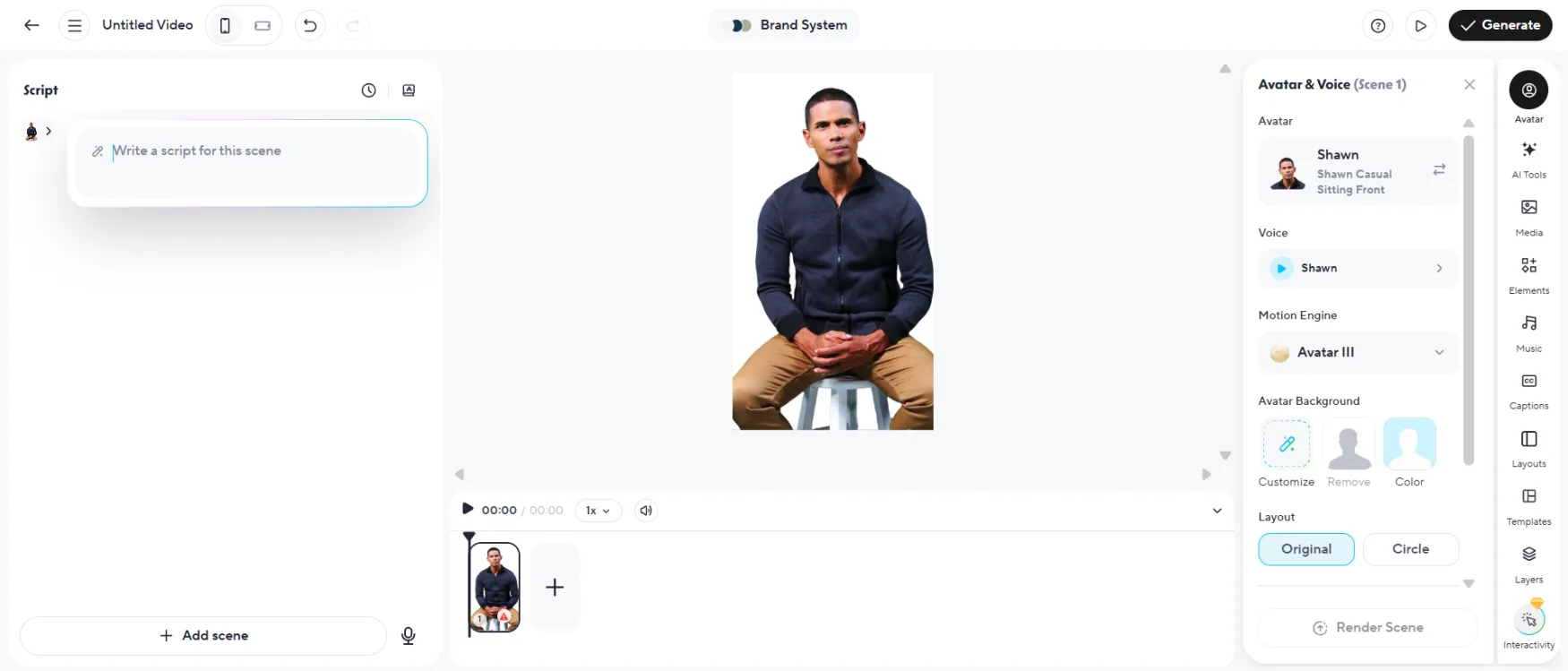
The AI Studio editor keeps you in a writing environment. There is no timeline to manage. Script on the left, avatar preview on the right. This layout is genuinely accessible for non-technical users.
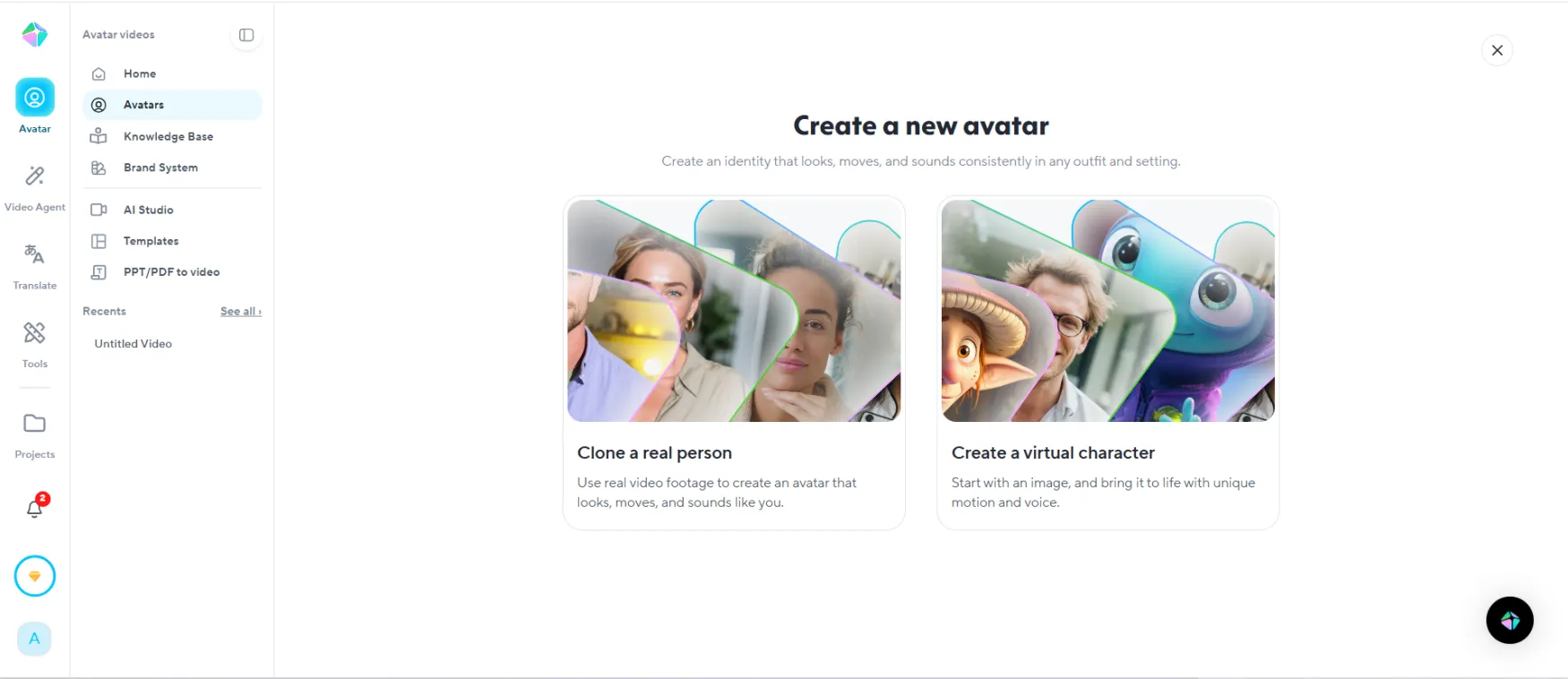
The Digital Twin setup. Record once, use indefinitely. This is the most important screen in the product for any founder who wants to appear in video without filming repeatedly.
The free plan is functional for real evaluation. Three videos per month is enough to test Digital Twin quality and Video Translator accuracy before committing to $29/month.
HeyGen's AI Studio is built around a text-based editor rather than a traditional video timeline. For a solo founder with no prior video editing experience, this is a meaningful advantage — there is no learning curve around keyframes, color grades, or audio tracks. You write, you select, you generate.
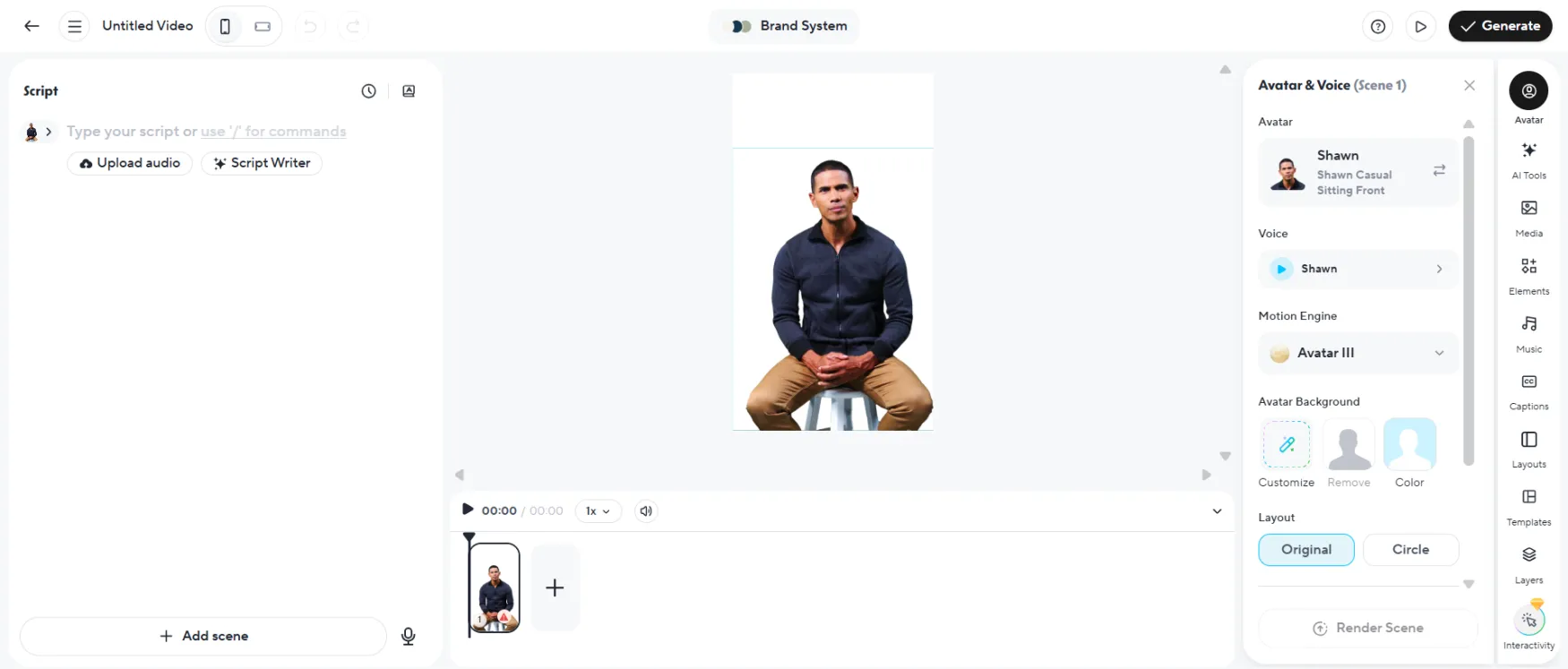
The Studio workspace keeps three things visible at once: script, avatar, and preview. There is nothing buried here. The absence of a timeline is the most useful design decision in the product for non-technical users.
The navigation is clean but shallow. The left sidebar surfaces six primary sections. Everything you need is within two clicks. This works well for a focused session but limits workflows where you want to compare multiple outputs side by side or manage a library of templates across multiple projects.
The template library is functional but thin. 75+ templates cover the most common formats — explainers, social clips, training videos. For a solo founder who produces in a consistent format, this is enough. For someone building brand-differentiated content that needs to stand apart visually, the templates will feel like a starting point rather than a production asset.
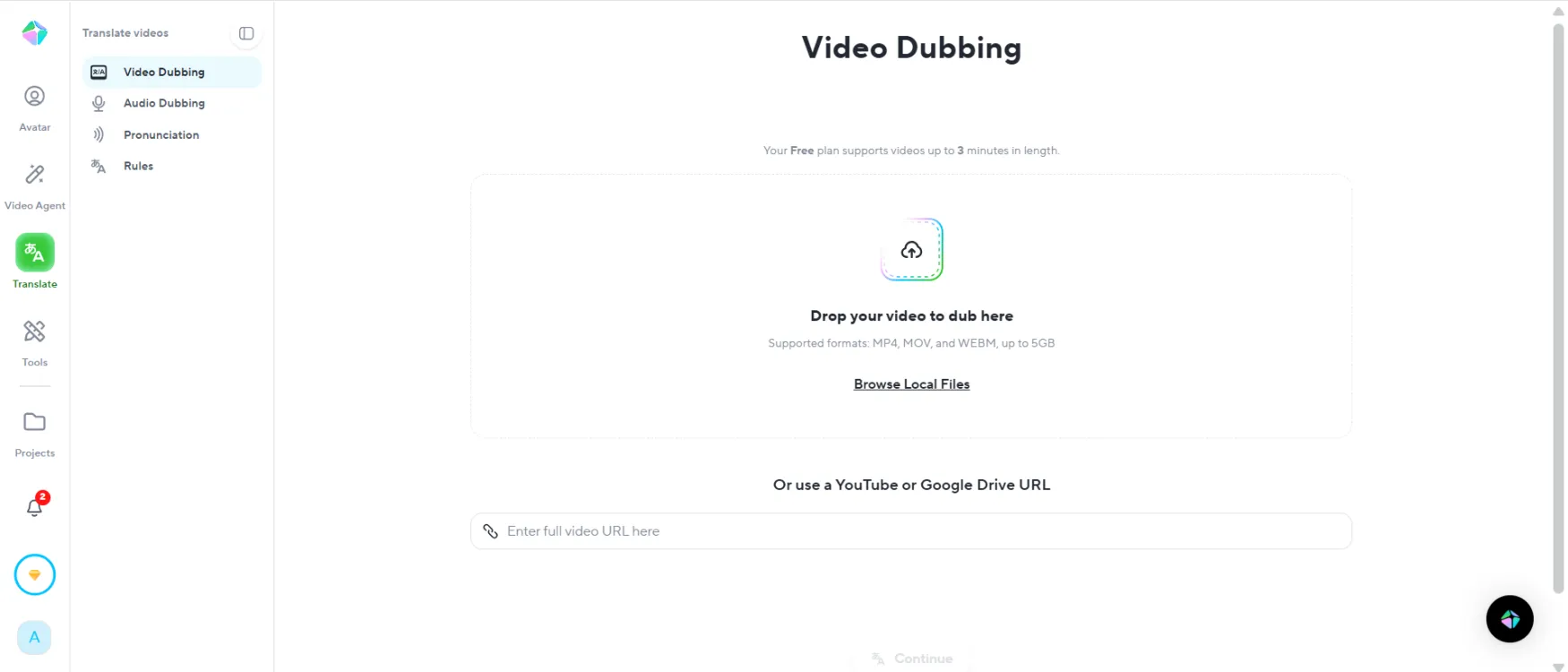
The Video Translator interface is the most confident part of the product. Upload, select languages, generate. No settings to calibrate. The simplicity here is appropriate — the complexity is handled invisibly.
Performance on a standard laptop is acceptable. The editor itself is fast. The generation queue is where the experience degrades on the Creator plan. Queue wait times between 12 and 28 minutes for the same project type make it impractical to generate, review, and immediately iterate within a single focused work session.
| Feature | Rating | Details |
|---|---|---|
| Digital Twin (Custom Avatar) |
|
Works as described for content under 3 minutes at Creator level. Avatar IV cap limits quality access on longer content. The core value — record once, use indefinitely — holds across all plans. |
| Avatar IV Generation Model |
|
Best AI avatar quality at this price when fully accessible. Creator plan caps at 5 minutes/month. Pro unlocks practical access. The quality advantage over previous models is visible and material. |
| Video Translator (175+ Languages) |
|
No comparable tool matches this capability at $29/month. Produces dubbed video with preserved voice and native lip-sync. Translation minute cap not clearly disclosed on pricing page — verify before subscribing annually. |
| Video Agent (Text to Video) |
|
Produces workable video structure from text input. Generic without a strong, specific script as input. Treat as a first draft generator, not a finished video tool. |
| Voice Cloning |
|
Unlimited on Creator and above. ElevenLabs integration available for higher fidelity. Clone quality scales directly with recording environment quality — a quiet room matters more than an expensive microphone. |
| Product Placement Ads and UGC Video |
|
Available on all paid plans. Functional for lightweight ad creation. Not optimized for e-commerce bulk generation. VidAU remains the better fit for product ad volume. |
| Credit and Processing System |
|
Credits consumed on iteration and previews, not just final export. Standard processing tier introduces unpredictable queue wait times on Creator. Both are undisclosed constraints on advertised plan features. |
| API Access |
|
Available on Pro and above with pay-as-you-go pricing. Zapier, Make, HubSpot, and n8n integrations on Business. For a technically confident solo founder building automated video delivery, the API is a genuine asset. |
Channel | Available On |
|---|---|
Email support | All plans |
Help center / documentation | All plans |
Live chat | Not available on Creator |
Priority support | Enterprise only |
What works: Email support handles general product questions adequately. The help center covers common setup and usage issues. If your subscription runs normally and you stay within plan limits, you are unlikely to need direct support at all.
What breaks down: The documented failure pattern is specific to billing disputes, refund requests, and cancellation issues. Multiple Trustpilot and Capterra reviews describe support as nonexistent or delayed beyond two weeks specifically when money is involved. Response times on financial remediation are not documented publicly — and the review record suggests they are not reliable.
This is the profile of a support system that functions for usage questions and fails when financial correction is required.
Start on monthly billing. If a billing error or unauthorized charge occurs, your exposure is one month, not twelve.
Keep payment receipts. Screenshot every charge confirmation. If a dispute arises, you will need documentation that support will not help you reconstruct.
Export videos locally and regularly. At least one verified user lost their entire video library to a platform glitch with no recovery offered. Local backup is non-optional regardless of plan status.
The review pattern for HeyGen across platforms is unusually bifurcated. Understanding it helps set the right expectations before subscribing.
On G2, the rating is 4.8/5 from 630+ reviews. On Trustpilot, it is 3.2/5. These are not measuring different things — they are measuring different user populations. G2 skews toward users who self-selected into technical product evaluation. Trustpilot captures a broader base, including users who subscribed based on the marketing page and then discovered the gap between advertised and actual capabilities.
An independent analysis of 100 Trustpilot reviews found 80% negative. The complaints are specific and consistent: billing changes mid-subscription, support failures on refund requests, plan upgrades charged without authorization, and "unlimited" language not matching actual plan behavior.
A verified Capterra review from a course creator: produced a training video in 5 languages in under an hour using Video Translator. Rated the tool highly specifically for that feature. No complaints about avatar generation limits.
A verified Trustpilot review from a solo marketer: subscribed to an annual Creator plan based on "unlimited video translation," then found translation minutes capped at 120/month without notice two months later. Support did not respond to the refund request within two weeks.
Both experiences are real. The difference is which features they relied on and whether those features performed as advertised at the plan level they purchased. The G2 population largely used what worked. The Trustpilot population largely hit the gap between the pricing page and plan reality.