
Unified sales intelligence and engagement platform for B2B teams
8.1/10 The strongest self-serve B2B prospecting platform for solo founders, free to start with no credit card.
Best for: Solo founders and early-stage teams doing B2B outbound without a sales team
Strongest at: 265M+ contacts, built-in sequences, and AI list-building in one platform, no annual contract
Main limitation: Free plan sequences connect Gmail and Microsoft only, other providers need a paid plan
Compared to: ZoomInfo at $15,000/year minimum requires a sales call before you see the platform
Try this first: Sign up free, search your ICP, check 20 contacts for verified email status
Apollo consolidates B2B data, sequencing, and deal tracking in one platform with no annual contract and no sales call required. The 265M+ contact database hits 91% email accuracy, and the AI Assistant builds lists and writes sequence copy directly inside the platform without switching tools.
What keeps it below 9 is two specific limitations. Free plan sequences only connect Gmail and Microsoft accounts. Any other email provider requires a paid plan before you can send a single sequence. Paid plan prices change regularly, so confirm current rates at apollo.io/pricing before upgrading.
Start on the free plan. Run one real campaign to contacts in your actual ICP before deciding whether upgrading is justified.
Skip it if you sell B2C, not B2B. Apollo's database is B2B contacts at companies. If your customers are individual consumers, the contact database has no value for your use case.
Skip it if you have zero interest in doing outbound. Apollo's core value is finding people to reach out to and then reaching out. If your entire go-to-market is inbound content, referrals, or community-driven, you're paying for tooling you won't use. A lighter CRM covers pipeline management for less.
Skip it if you need a primary CRM, not a prospecting layer. Apollo has deal pipelines and tracking, but it syncs with Salesforce and HubSpot rather than replacing them. If you need contact history, client communication logs, project management, and billing in one place, a purpose-built CRM handles that more completely.
Skip it if your target market has thin database coverage. Apollo's 265M+ contacts varies in density by geography and industry. Niche markets, non-English-speaking regions outside Western Europe, and highly specialized industries may have lower coverage than US-based tech, financial services, and professional services. Test your specific market on the free plan before upgrading.
Apollo's core strength is the combination of data quality and workflow integration. Most B2B data tools give you a database and stop there — you export a list and switch to another tool to do something with it. Apollo keeps you in one interface from list-building through sequence execution through deal tracking, which removes the friction that kills outbound consistency for solo founders managing every function of their business.
The AI Assistant (apollo.io/ai/assistant) is a genuine workflow upgrade from copy-paste AI tools. The official page describes it as executing outputs "directly in Apollo, right where you work." In practice: you describe your ICP in plain language, and the Assistant builds the list, generates the sequence copy, and sets up the campaign — without tab-switching. For a founder who isn't a prompt engineer and doesn't have time to learn complex tooling, this matters.
The free plan is also genuinely functional, not just a teaser. Free forever with no credit card, access to the contact database, email sequencing, and the Chrome Extension means a solo founder can run a real outbound motion on the free plan before committing to a paid subscription. That's rare at this capability level.
The security and compliance stack confirmed at apollo.io/product/b2b-data — SOC 2, ISO 27001, GDPR as both Data Processor and Data Controller, CCPA, CPRA, EU-US DPF, PCI DSS, CASA Tier 2 — is meaningfully stronger than most tools at this price point. For founders who handle client contact data, this matters.
The free plan's email provider limitation is the biggest day-one friction point. If your business email doesn't run through Google Workspace or Microsoft 365, you can't connect it to sequences on the free plan. You'll discover this when you try to set up your first sequence. Check your email provider before signing up if this applies to you.
The credit system requires upfront learning to avoid wasting allocation. Export credits — consumed when you push contacts outside Apollo — are the most commonly misunderstood part of the platform for new users. Bulk exporting a 500-contact list to a CSV in the first session before you've learned the credit model can exhaust your monthly allocation before you've launched a single campaign. Read the credit documentation before your first export.
Apollo's database, while the largest by count at 265M+ contacts, varies in density by market. The 91% email accuracy rate is the platform average — your specific market segment may be higher or lower. Test coverage for your exact ICP during the free plan before committing to a paid tier.
Apollo is a prospecting and outreach tool. Its value depends entirely on whether outbound email and phone outreach is a viable channel for your business. If your market has tight email deliverability constraints (financial services, healthcare, highly regulated industries), if your buyers are primarily reachable through referrals or events rather than cold outreach, or if you're still figuring out whether outbound is a channel you'll use at all — the paid plan investment may not generate ROI before the billing cycle renews.
The free plan removes most of this risk. You can test the database coverage, the sequence workflow, and outbound viability for your market before paying. The honest recommendation is: run one real campaign on the free plan — actual contacts in your ICP, actual outreach, actual measurement of reply rates — before deciding whether upgrading is justified.
The task: find 50 VP-level decision-makers at US-based marketing agencies with 10 to 50 employees, and launch a 3-step cold email sequence to book discovery calls.
Step 1 (2 min): Sign up at apollo.io/sign-up. Email, Google, or Microsoft login. No credit card required. You land on the Home dashboard immediately — a personalized welcome screen showing AI-generated Recommendations (prioritized as Important or Valuable) and a Suggested leads section. The Onboarding hub sits at the bottom of the left sidebar showing your completion percentage. You don't need to complete it before searching.
Step 2 (5 min): In the left sidebar, under "Prospect and enrich," click People. The Find people interface opens with the full filter panel on the left. Apply filters: Job Titles, set Company to Marketing and Advertising, # Employees to 10–50, Account Location to United States. Apollo returns a live count — the interface shows how many contacts match your current filters at the top. Contact rows show name, job title, company, and "Access email" and "Access Mobile" buttons. Emails are not revealed by default — you click to access them, which is when credits are consumed.
Step 3 (3 min): Review the filtered list and check email status using the Email Status filter. Set it to Verified to exclude catch-all and unverified contacts before saving. Select contacts using the bulk select checkbox and save them to a new list under Lists (also in the Prospect and enrich group).
Step 4 (10 min): In the left sidebar, under "Engage," click Sequences. Create a new sequence. Step 1: a personalized intro email. Use the AI Assistant button in the top navigation to draft it from a plain-language description of your offer — it writes the copy directly in Apollo without tab-switching. Step 2: a follow-up 3 days later if no reply. Step 3: a short closing-the-loop email 5 days after that. Set sending schedule, daily send limits, and connect your Gmail account.
Step 5 (2 min): Enroll the saved list into the sequence. Apollo checks for duplicate enrollment before adding contacts. Confirm and launch.
Total time: approximately 20 to 25 minutes from account creation to an active sequence sending to 50 verified prospects. Sourcing the same 50 contacts manually from LinkedIn takes the better part of a day.
One honest note: the Advanced Dialer is shown as an add-on in the platform banner — "Unlock 2x more connected calls with Parallel, Power, and International Dialing" — with separate add-on pricing. The standard built-in dialer handles basic outbound calls; the advanced parallel and power dialing capabilities require an additional purchase.
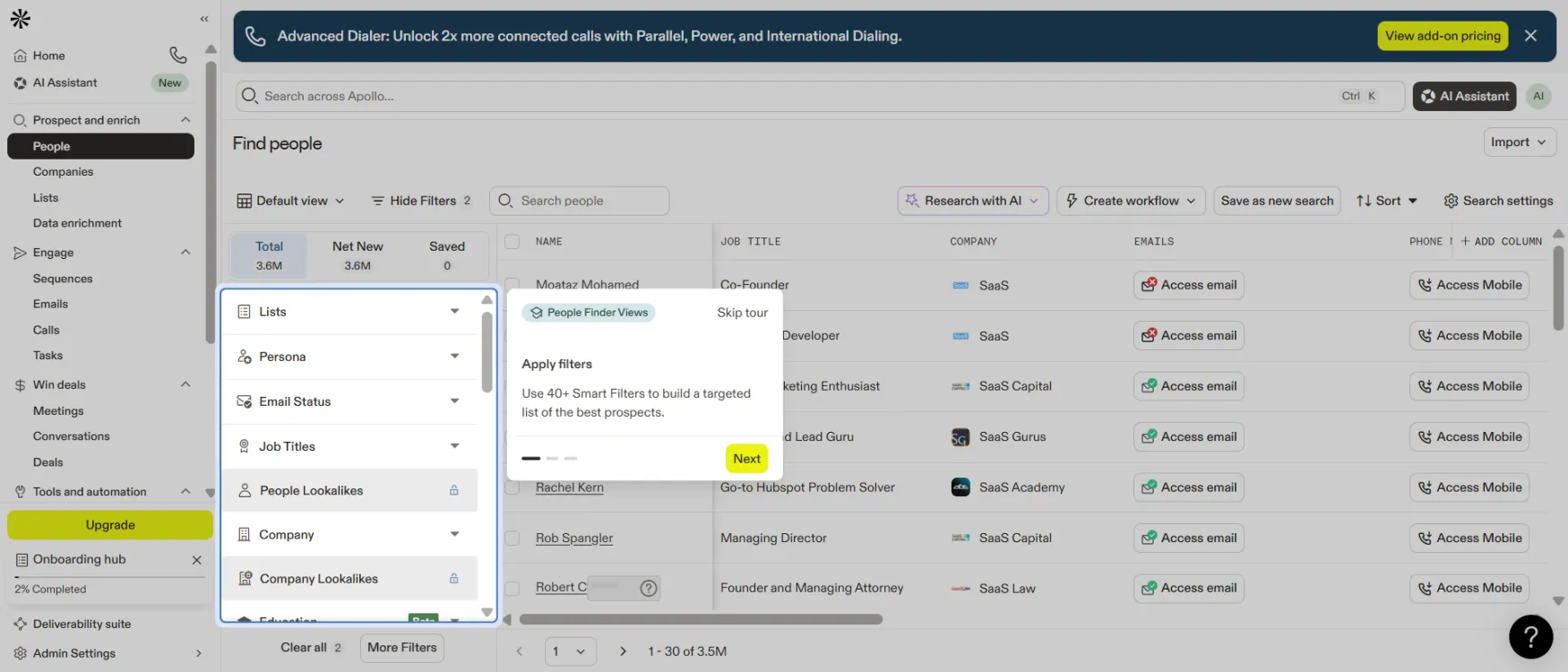
Emails and mobile numbers are not shown by default — you click 'Access email' or 'Access Mobile' to reveal them, which is when credits are consumed. Apply the Email Status filter to Verified before accessing to avoid wasting credits on bad addresses.
For a solo founder doing B2B outbound, the ROI case for Apollo's paid plans is straightforward to calculate. The free Starter plan covers the basic prospecting and sequencing workflow. If you're under the free plan's volume limits and only need Gmail or Microsoft email connections, you may never need to upgrade — multiple founders run their entire outbound motion on the Apollo free plan indefinitely.
When you do upgrade, compare the paid plan cost against the tools it replaces. Apollo positions itself explicitly against the ZoomInfo plus Outreach combination on the outbound solution page. For a solo founder, even the comparison against a single standalone data tool (Lusha at $49/month) plus a standalone sequencing tool (Mailshake at $59/month) is favorable once you add them together.
The official homepage documents 75% more meetings booked, 4x SDR efficiency, and 64% lower tech stack costs from named customer testimonials. At solo founder scale, the most relevant metric is time: the outbound solution page references hours saved per week replacing manual prospecting with AI-assisted list building and automated follow-up. Exact paid plan prices should be verified at apollo.io/pricing.
Starter — Free forever. No credit card required. Contact database search, email sequences (Gmail and Microsoft only), Chrome Extension, basic pipeline tracking. Trial plans include 50 credits and 5 mobile credits with access to nearly all features of the selected paid tier. After trial you can stay on Starter permanently or convert to a paid plan.
Paid plans (Basic, Professional, Custom) add: higher credit limits, non-Gmail/Microsoft email connections, mobile number credits, advanced AI features, higher usage limits, and additional integrations. Apollo's Unlimited plans are governed by a Fair Use Policy: 10,000 credits per account per month for non-paying accounts, or the lesser of [dollars paid / $0.025] or 1,000,000 credits per account per year for paying accounts (per official pricing FAQ).
Export credits explained: Export credits are consumed when you push contact data outside Apollo — to a CRM, to a CSV export, or via API. Viewing, searching, and sequencing contacts inside Apollo does not consume export credits. Understanding this before your first bulk export prevents the most common credit-burn mistake for new users.
Cancellation terms (confirmed from official pricing FAQ): Cancellations take effect at end of billing cycle. Upgrades take effect immediately. No advance written notice required. No auto-renewal penalty for missing a cancellation window.
Note: Exact paid plan prices for Basic, Professional, and Custom tiers were not confirmed from the live page at time of writing due to JavaScript rendering. Verify current prices at apollo.io/pricing before upgrading.
Pricing last verified March 2026. Confirm current plan details at apollo.io/pricing.
Apollo lands you on a personalized Home dashboard immediately after signup — no forced configuration before you can search. The homepage shows two things right away: a Recommendations section with prioritized action items (tagged Important or Valuable) and a Suggested leads section with People and Companies tabs. The first recommendations shown on the free plan include downloading the Chrome extension, adding teammates, and building your pipeline with bulk select.
The left sidebar organizes the platform into four clear groups. Prospect and enrich covers People, Companies, Lists, and Data enrichment. Engage covers Sequences, Emails, Calls, and Tasks. Win deals covers Meetings, Conversations, and Deals. Tools and automation covers Workflows and Analytics, with Inbound (Website visitors, Forms) as a subgroup. The Onboarding hub lives at the very bottom of the sidebar — it shows your completion percentage (starts at 2%) and persists across every screen as a reminder without blocking access to anything.
The Onboarding hub itself is gamified. Completing tasks earns Apollo credits — the Recommended setup track offers 150 credits across 12 tasks, and individual micro-tasks like "Find and save ideal leads" earn 5 credits in about 1 minute. At signup, the platform also shows a "Helpful tip" popup confirming it has enriched your company profile from your website and asking you to review it for accuracy before using the AI.
Magic moment: The Find people search returning 265M+ contacts filtered to a precise segment — name, job title, company, and "Access email" / "Access Mobile" buttons per row — within 3 minutes of account creation.
Friction point: The "Access email" and "Access Mobile" buttons reveal contact data on click — that click is when credits are consumed. New users who click through emails on a large unfiltered list before setting Email Status to Verified will burn through their credit allocation on unverified or catch-all addresses. Set the Email Status filter to Verified before accessing any contact data.
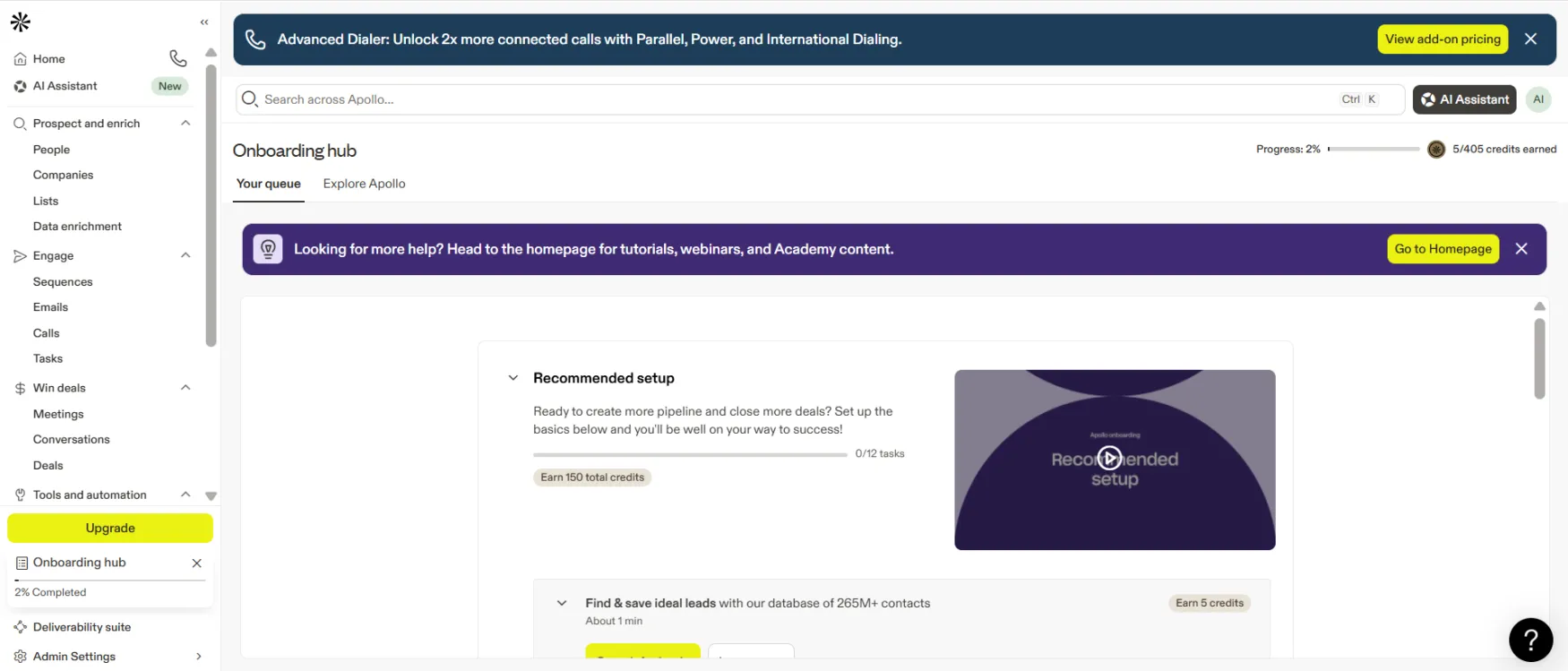
The Onboarding hub sits at the bottom of the left nav and stays visible across every screen. Completing tasks earns credits — useful for getting more out of the free plan before upgrading.
The current Apollo interface is organized around four sidebar groups that mirror the actual sales workflow: Prospect and enrich (People, Companies, Lists, Data enrichment), Engage (Sequences, Emails, Calls, Tasks), Win deals (Meetings, Conversations, Deals), and Tools and automation (Workflows, Analytics). That grouping is cleaner and more intuitive than a flat navigation list — you can infer where to go for a given task without reading documentation first.
The Home dashboard shows personalized Recommendations on login with priority labels (Important, Valuable) and Next Steps buttons. For a new user, the three starting recommendations are practical: install the Chrome extension, add teammates, and use bulk select. It's a more useful landing screen than a generic "getting started" checklist.
The People and Companies search interfaces are the strongest part of the UX. The filter panel sits on the left and groups filters logically — Lists, Persona, Email Status, Job Titles under People; Lists, Company, Account Location, # Employees, Industry & Keywords under Companies. The live contact count updates as you apply filters, so you see immediately how many prospects match your criteria. Advanced filters (Lookalikes, Revenue, Funding) are visible but locked with a padlock icon and a "View plans" prompt — transparent about what's gated rather than hiding it.
Contact rows show "Access email" and "Access Mobile" buttons per row rather than revealing data by default. This is the right design choice for credit management, but it's not immediately obvious to new users that clicking those buttons consumes credits. The first-session friction point is clicking through a large unfiltered list before understanding the consumption model.
The Workflows interface under Tools and automation includes pre-built templates organized by type (Linear, AI, Multi-branch, Generate pipeline). The four visible templates — Convert ideal customers with AI sequences, Target Website Visitors, Engage companies researching your category, Target new hires in first 90 days — are practical starting points for a solo founder who has never built a workflow before.
The Advanced Dialer is prominently surfaced as an add-on via a banner at the top of every screen: "Unlock 2x more connected calls with Parallel, Power, and International Dialing." It includes a "View add-on pricing" button. The standard dialer for basic outbound calls is included — the add-on unlocks parallel dialing and international calling specifically.
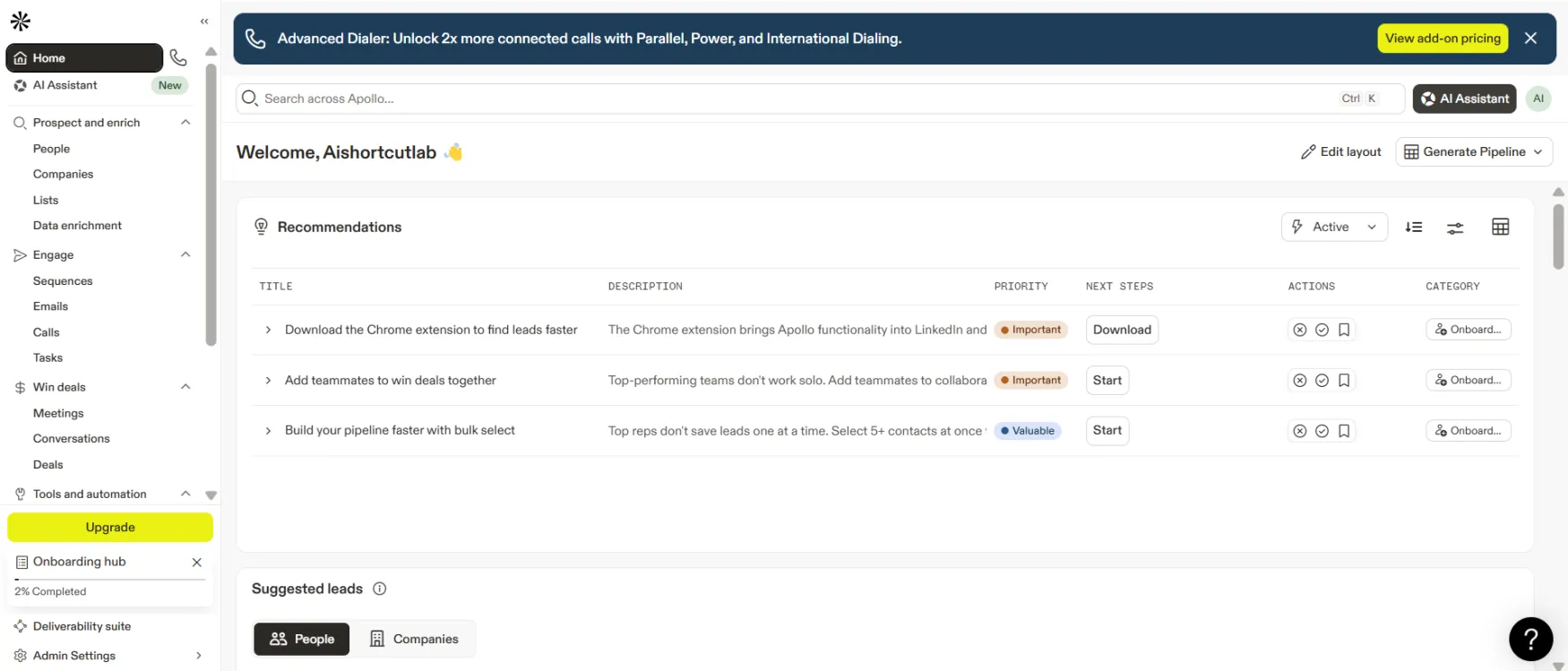
The Home dashboard shows prioritized action recommendations on every login. Priority tags (Important, Valuable) and Next Steps buttons make it easy to know what to do first — no hunting through menus.
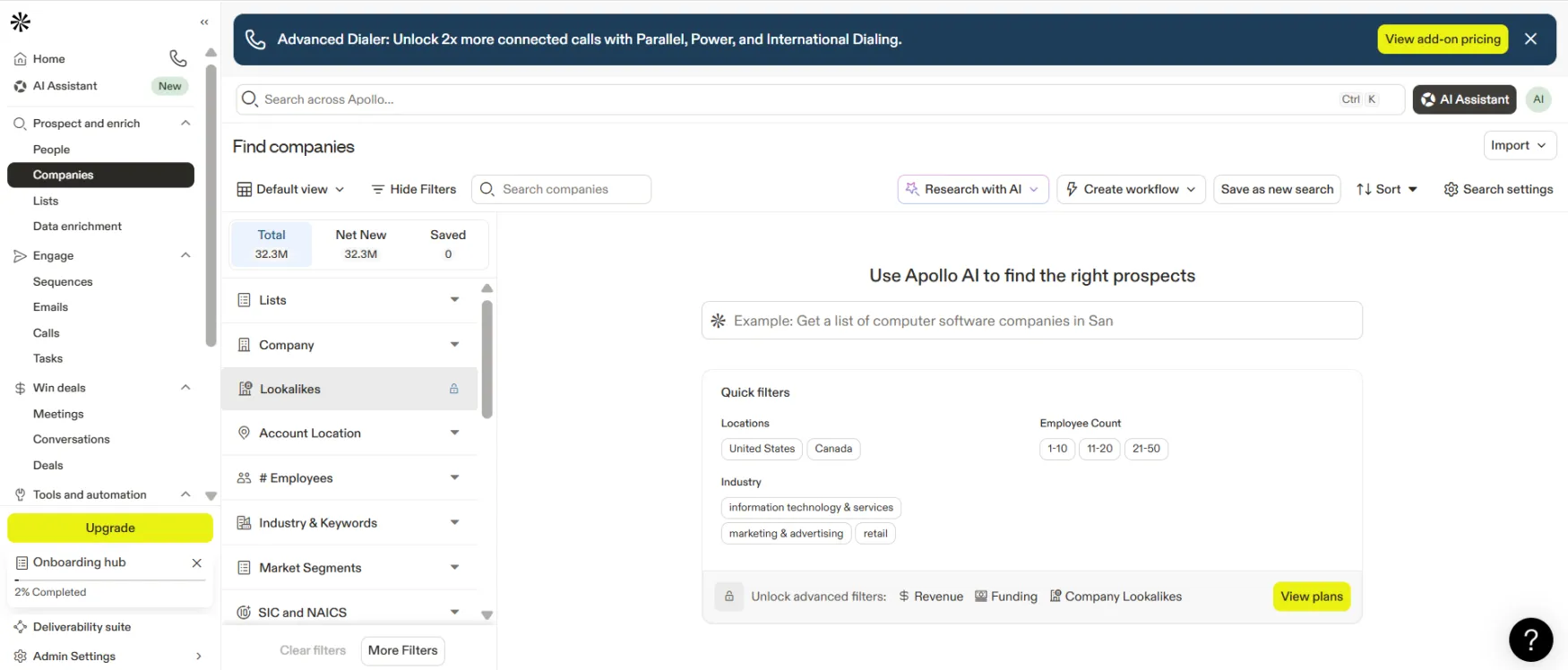
Advanced filters including Revenue, Funding, and Company Lookalikes are visible but locked behind paid plans — you see what's available before committing.
| Feature | Rating | Details |
|---|---|---|
| Contact Database |
|
265M+ contacts, 30M+ companies, 65+ filters, 91% email accuracy rate, 72M emails verified monthly. Strongest in US-based tech, financial services, and professional services. Test your specific ICP on the free plan before upgrading. |
| Email Sequences |
|
Multi-step automated campaigns with A/B testing, reply detection, deliverability guardrails, and built-in sending schedule management. Included on every plan including free (Gmail and Microsoft connections). Non-Gmail/Microsoft email requires a paid plan. |
| AI Assistant |
|
Builds lists and sequences from plain-language descriptions directly inside Apollo, without copy-pasting. Captures your product, audience, and positioning once and uses that context across every output. Still developing for complex multi-signal workflows. |
| Workflow Automation |
|
Triggers automated GTM actions based on data signals: job changes, intent spikes, website visits, funding rounds. Covers the most common automation needs for solo founders and small teams. Advanced multi-branch conditional workflows require more configuration time. |
| Inbound Lead Conversion |
|
Anonymous visitor identification, real-time form enrichment, instant routing to calendar, automated nurture sequences. A complete inbound stack in one tool. Most founders discover these features after starting with outbound. |
| Chrome Extension |
|
Pull Apollo contact data on any LinkedIn profile or company website without leaving the browser tab. Available on all plans including free. One of the most consistently useful features for founders doing LinkedIn-heavy research. |
| Deal Pipelines |
|
Multiple customizable pipelines with visual boards and deal analytics. Functional for tracking B2B sales conversations and stages. Not a full CRM — contact history and client communication logging belong in Salesforce or HubSpot. Apollo syncs to CRMs rather than replacing them. |
Apollo offers a Knowledge Base at knowledge.apollo.io with extensive documented answers to setup and feature questions. The Apollo Academy at apollo.io/academy provides structured learning for new and experienced users. Cancellation and plan changes are self-serve: cancel in Plan Overview within account settings or by emailing support@apollo.io. Cancellations take effect at end of billing cycle with no advance notice window required.
For direct support, Apollo provides email-based support on standard plans. Custom plans include dedicated support options for enterprise needs. Apollo is SOC 2 certified, ISO/IEC 27001 certified, GDPR compliant as both Data Processor and Data Controller, CCPA and CPRA compliant, EU-US DPF certified, PCI DSS compliant, and CASA Tier 2 certified — all confirmed via the official Apollo Data page at apollo.io/product/b2b-data. For a solo founder connecting an email account and storing contact data in a third-party platform, this security certification stack is meaningfully stronger than most tools at this price point.
This review uses only official Apollo sources per editorial policy. What official sources confirm: Apollo is used by 500,000+ companies and holds a 4.7/5 rating based on 9,015 reviews as of early 2026, with G2 Spring 2025 Top 100 badges for Highest Satisfaction, Best Software Products, Top 50 Sales Products, Top 50 Small Business Products, and Top 100 Global Sellers (per the official pricing page).
The official AI Assistant page at apollo.io/ai/assistant includes named customer testimonials from verified users at Idomoo, RapidSOS, Smartling, YipitData, TransPerfect, JumpCloud, and Crusoe. The consistent pattern: time savings on prospecting prep and faster sequence building. One specific data point from Dr. Jonathan Chenier, Director of Business Development at TransPerfect: "It saves me about an hour per prospecting session." The official homepage cites 75% more meetings booked (Andrew Froning, BDR Leader), 4x SDR efficiency (GTM Ops), and 64% lower tech stack costs (Census).
For independent user perspective, the Apollo community at apollo.io/community is an active self-serve resource where users share workflow tips, sequence templates, and ICP-building strategies.
See how Apollo.io stacks up against ZoomInfo in our detailed comparison.

See how Apollo.io stacks up against Lusha in our detailed comparison.

See how Apollo.io stacks up against Hunter in our detailed comparison.
See how Apollo.io stacks up against UpLead in our detailed comparison.
See how Apollo.io stacks up against Adapt.io in our detailed comparison.
