
Professional email discovery and verification platform for B2B outreach.
8.0/10 The most focused and honest email finding platform for solo founders doing B2B outreach. Free plan included, no contract required.
Hunter earns its score by doing one job well and making it accessible without friction. The email finding accuracy is built on 150 million indexed addresses from 650 million public sources. Every result comes with its source URL. The free plan gives 50 credits with no credit card required.
What holds the score below 9 is Signals. Intent data tracking is genuinely useful, but 20 signals per month on Starter isn't enough to build a workflow around. You'd need Growth at €149/month for 200 signals per month. If intent-triggered outreach matters to you, budget for Growth from the start.
Start on the free plan. Run searches for your actual target companies and check how many verified emails come back before paying anything.
Skip Hunter if you need phone number coverage. Hunter is an email-only platform. There are no direct dials, no mobile numbers, and no dialer. If cold calling is your primary outbound channel, Lusha has 280M+ direct dials and 86% phone accuracy.
Skip it if you want a full outbound platform with inbound lead routing. Hunter handles email finding and cold email sequences cleanly. It doesn't identify anonymous website visitors, route inbound leads, or manage deal pipelines. Apollo.io covers that full stack.
Skip it if Signals is central to your prospecting strategy on a tight budget. You get 20 signals per month on Starter. That's not enough for a consistent intent-based outreach workflow. Growth at €149/month gets you 200 per month.
Skip it if you need live chat support. Support on all plans is email-based only. There's no live chat on any tier, including Scale at €299/month. If you need fast answers when something breaks, know that before you build your daily workflow here.
Hunter was built around a single observation: finding a professional email address takes too long and produces too many wrong answers. Guessing firstname@company.com variations, cross-referencing LinkedIn with outdated directories, getting bounces — all of it burns time that a solo founder doesn't have. Hunter's answer was to index the public web at scale, source every address from a disclosed URL, and surface the result with a confidence score so you can decide whether to use it.
That core job hasn't changed since 2015. What has changed is the platform built around it. Hunter now handles the full email outreach workflow: find the address, verify it, write the cold email with AI assistance, send a multi-step sequence, track the replies, and sync everything to your CRM. You don't need a separate tool for any of those steps.
Using Hunter day-to-day feels light. The interface is minimal and fast. Domain Search, Email Finder, and Sequences are the three tools you'll use most often, and all three are accessible from the sidebar in under one click.
The workflow has a natural sequence to it: you identify a target company or person, run the Domain Search or Email Finder to get their verified address, drop them into a list, and enroll them in a sequence. That entire path stays inside Hunter. There's no export-to-CSV, import-to-outreach-tool friction that breaks the momentum of a prospecting session.
The transparency about data sources is the part that distinguishes Hunter from most alternatives. Every email returned by Domain Search includes the web page where Hunter found it. That means when you email someone cold, you can say truthfully that you found their address published on their company website. For founders nervous about GDPR or about recipients asking "how did you find me," that specificity is meaningful.
The limitation you feel at daily use is the credit system. 50 credits on the free plan sounds like a reasonable testing allocation. It isn't, once you start doing real prospecting. A single Domain Search on a company with a medium-sized team returns multiple results. If you're testing five or ten companies to evaluate coverage, you can burn through your monthly free allocation in one session. Starter at €49/month brings that to 2,000 credits, which is enough for consistent solo outreach.
Domain Search is the product's strongest feature and the most commonly used. You type a company website and Hunter returns everyone it has indexed at that domain, with confidence scores ranked from highest to lowest. The source URL for each result tells you exactly where on the web the address was found and when. Results with a high confidence score and a recent source date are the ones to start with.
In practice, coverage varies by company type and size. Hunter's database is strongest for US-based tech companies, professional services, and established SMBs with professional web presences. Coverage for very small businesses without a prominent web presence or for companies in certain non-English-speaking markets is thinner. The free plan is the right way to test coverage for your specific ICP before committing to a paid tier.
Sequences is a complete cold email campaign tool built into the platform. You write your emails, configure follow-up timing, set daily sending limits, and send from your own Gmail or Outlook account. The AI Writing Assistant generates email copy from a plain-language description of your offer and target audience. It's available on Starter and above and saves the context-switching of opening a separate AI tool to draft outreach copy.
The daily sending limit defaults to 15 emails per day — a conservative setting designed to protect deliverability. Advanced users can raise this to up to 400/day for Gmail and 250/day for Outlook and SMTP/IMAP connections, per the official Sequences FAQ. For most solo founders doing targeted outreach rather than mass blasting, 15 to 50 per day is the right range. The default is sensible.
One gap worth knowing: click tracking and image attachments in sequences require a paid plan. On the free tier you get open tracking but not click tracking. If tracking link clicks matters to your outreach measurement, factor that into the plan decision.
Email Verifier does what it says — it checks whether any email address is valid and deliverable before you send. On paid plans, verification runs automatically on emails found through Hunter before they're added to a sequence. On the free plan, you run it manually. The cost is 0.5 credits per verification, and verification is free if Hunter can't determine the status. For a solo founder building a list from various sources, running the verifier before a campaign start protects your Gmail or Outlook sender reputation from bounce damage.
The Signals cap is the biggest one. The free plan gets 10 Signals per month. Starter gets 20. If you set up signals to track funding rounds or job postings across your target accounts, 20 activations per month is genuinely not enough to build a workflow around. You'd get better mileage monitoring 5 to 10 key accounts manually on the free plan than depending on 20 monthly Signals on Starter. For Signals to be practically useful, you need Growth at €149/month.
The free plan's sequence recipient cap is 500. If you build a list of 600 verified prospects and try to enroll them in a sequence, you'll hit this wall mid-campaign. Starter raises it to 2,500. Know your list size before choosing a plan.
Non-Gmail/Outlook email providers require SMTP/IMAP on a paid plan. Hunter Sequences natively connects to Gmail and Google Workspace accounts and to Microsoft 365 and Outlook accounts. If your business email runs through Fastmail, Zoho Mail, ProtonMail, or any other provider, you need to use the SMTP/IMAP connection, which is only available on Starter and above. The free plan doesn't support it. This catches people who use a custom domain email that isn't hosted through Google or Microsoft.
Coverage in non-English-speaking markets and niche industries is thinner. Hunter crawls 30 million web pages daily and indexes addresses found on the public web. Companies with a strong web presence — particularly tech companies, professional services, and established businesses in the US and Western Europe — are well-covered. Very small businesses, local service businesses, and companies in markets where professional contacts are not commonly published online will return fewer results.
On the Starter plan at 2,000 credits per month, the realistic daily ceiling depends entirely on how you use credits. Email Finder costs 1 credit per email found. Email Verifier costs 0.5 credits per email verified. Domain Search costs 1 credit per email found across the entire domain.
If you're using Hunter primarily for Email Finder on individual contacts, 2,000 credits supports around 2,000 lookups per month or roughly 65 per day. If you're combining Domain Search and verification, the math changes. A Domain Search on a company returning 10 emails costs 10 credits. Verifying those same 10 addresses costs an additional 5. One company research session can cost 15 credits. At that rate, 2,000 credits supports research on around 130 companies per month.
For a solo founder doing targeted outreach to 20 to 50 new companies per week, Starter at 2,000 credits/month is enough. At higher research volumes, Growth at 10,000 credits/month makes more sense.
Task: Building a cold email list and launching a first sequence for a B2B partnership campaign.
The target is 30 verified contacts at marketing agencies with 10 to 50 employees in the UK.
Step 1 (3 min): Open Discover. Filter by industry (Advertising and Marketing), headcount (10 to 50), and location (United Kingdom). Hunter returns matching companies. No credits are consumed yet. Discover searches are unlimited. Save the search as an ICP to auto-refresh daily.
Step 2 (5 min): Select 15 companies from the results. Run a Bulk Domain Search to pull email addresses for all of them at once. Hunter returns results with confidence scores. 15 companies returning an average of 3 addresses each costs roughly 45 credits.
Step 3 (2 min): Filter results to show only high-confidence addresses. Save them to a list. Auto-verification runs automatically on Starter, so addresses are verified before hitting the list.
Step 4 (10 min): Go to Sequences. Create a 3-step sequence: an intro email, a follow-up after 3 days if no reply, and a closing email 5 days after that. Toggle on the AI Writing Assistant, describe your offer in plain language, and generate a first draft. Edit the copy to sound like you. Set sending to weekdays, 9am to 5pm, 20 emails per day maximum.
Step 5 (2 min): Enroll the list into the sequence. Hunter checks for duplicate enrollments before adding contacts. Confirm and activate.
Total time: approximately 22 minutes from zero to an active sequence. The same process manually takes most of a day.
Honest note: the AI Writing Assistant output is a functional starting point, not a finished email. It needs editing to sound like you. Budget an extra 10 minutes per sequence to get the voice right.
At €49/month for the Starter plan, Hunter costs the equivalent of roughly 39 minutes at a €75/hour rate. If it saves you one hour per month on contact research, it's returned its cost more than once over.
The more honest comparison is what you'd pay otherwise. A freelance researcher finding and verifying 100 contacts typically charges €50 to €150. Hunter finds and verifies the same contacts using Starter's 2,000 monthly credits for a fraction of that cost.
The ROI is clearest for solo founders doing consistent outbound. If you're reaching 10 to 30 new contacts per week, Starter at €49/month covers that workflow. At €34/month on annual billing, the math becomes even clearer.
The ROI is weakest for occasional outreach. If you send cold emails a few times per year, the free plan's 50 monthly credits may be enough without upgrading. Hunter is explicit about this: a one-month Starter subscription for a specific campaign and a downgrade to free afterwards is fully allowed per the official pricing FAQ.
Hunter has four paid plans plus a permanent free tier. All prices are in euros. Annual billing saves 30%.
Free — €0/month. 50 credits per month (600 per year). One connected email account. 500 recipients per sequence. Basic Discover filters. No credit card required. Enough to test database coverage for your target market. Not enough for consistent outreach at real volume.
Starter — €49/month (€34/month billed annually at €408/year). 2,000 credits per month (24,000 per year). Three connected email accounts. 2,500 recipients per sequence. Advanced Discover filters. AI Writing Assistant. Lead enrichment. Auto-verification. 20 Signals per month. This is the realistic entry point for a solo founder running regular cold email outreach.
Growth — €149/month (€104/month billed annually at €1,248/year). 10,000 credits per month. Ten connected email accounts. 5,000 recipients per sequence. 200 Signals per month. The plan to consider if you're prospecting at serious volume or if intent signal data is core to your workflow.
Scale — €299/month (€209/month billed annually at €2,508/year). 25,000 credits per month. Twenty connected email accounts. 15,000 recipients per sequence. Unlimited Signals.
Annual vs. Monthly: Annual saves 30%. Starter drops from €49 to €34/month, saving €180/year. No features are locked behind annual billing. Start monthly until you've confirmed the tool fits your workflow, then switch.
Credit counting: 1 credit per email found. 0.5 credits per email verified. Free if nothing is found. The same search in the same billing period counts once. Additional email accounts cost €10/month per account on any paid plan.
Price history: Hunter has been operating since 2015. It's bootstrapped and independently owned. No significant pricing changes have been documented. That stable pricing history matters when you're building a daily workflow on a tool.
If You Cancel: Saved leads export as a CSV at any time on all plans including free. Access continues until the end of your billing cycle. Credits aren't refunded on cancellation. No meaningful data lock-in.
⚠️ The plan most solo founders actually need: Starter at €49/month. Growth only makes sense if Signals volume matters to you or you're running high outreach volume.
Prices last verified March 2026. Confirm current rates at hunter.io/pricing before subscribing.
Sign-up takes under two minutes. No credit card required. After creating your account, Hunter walks you through a short survey asking what you want to achieve (finding emails, verifying them, or sending cold sequences). Your answer determines where you land first. If you select email finding, you arrive at the Finder. If you select sequences, you go straight to Sequences. The platform routes you to the right starting point rather than dumping you on a generic dashboard.
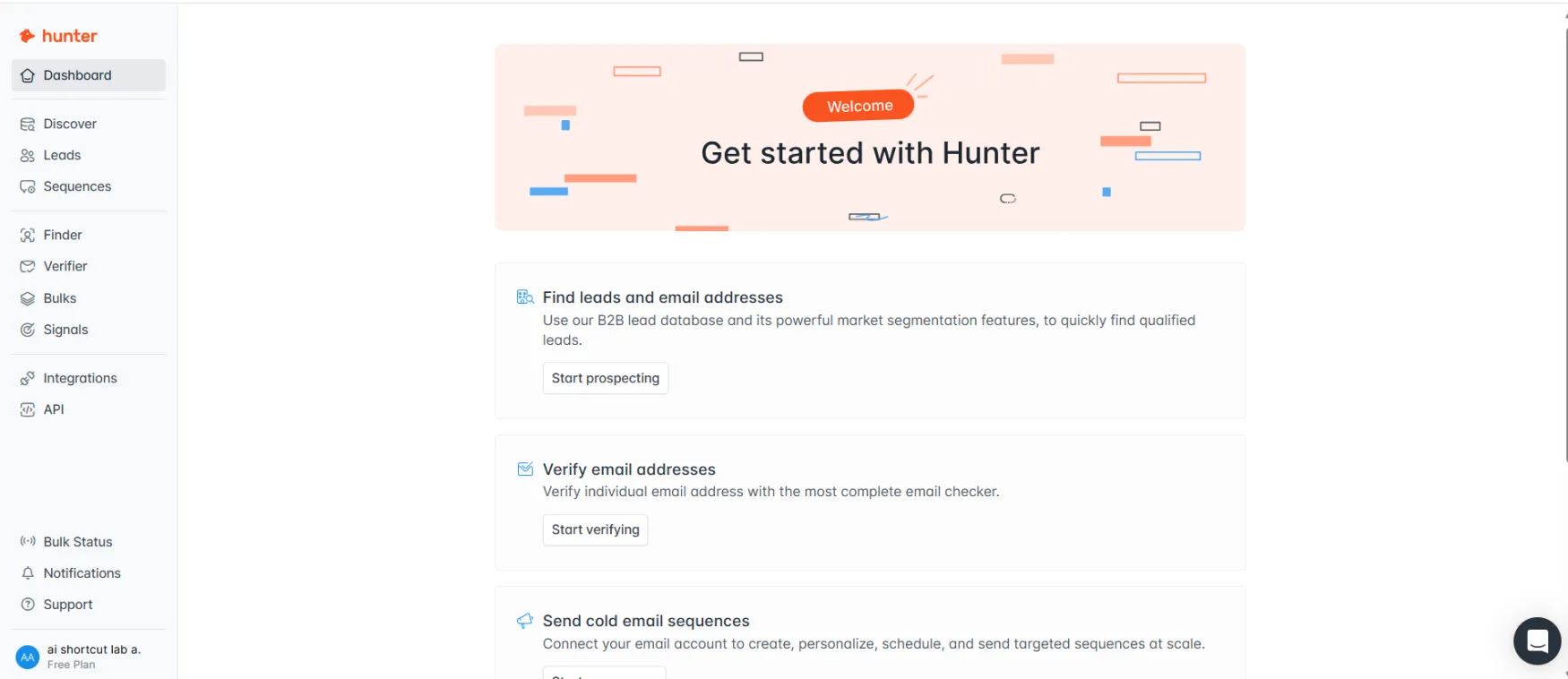
The dashboard itself is a getting started hub. Three clear action blocks appear on the welcome screen: Find leads and email addresses, Verify email addresses, and Send cold email sequences. Each has a button that takes you directly into the relevant tool. There's no hunting through settings or reading documentation to understand where to go first.
The magic moment happens early. Every section you open on the free plan launches a short video tutorial overlay. The Finder opens with "Find emails with the Domain Search" and a Take a tour button. Sequences opens with a Tutorial button in the empty state. Signals opens with a three-minute intro video. You can watch or skip every one of them. The placement is well-judged — the tutorials appear when they're relevant, not as a forced onboarding sequence before you can do anything.
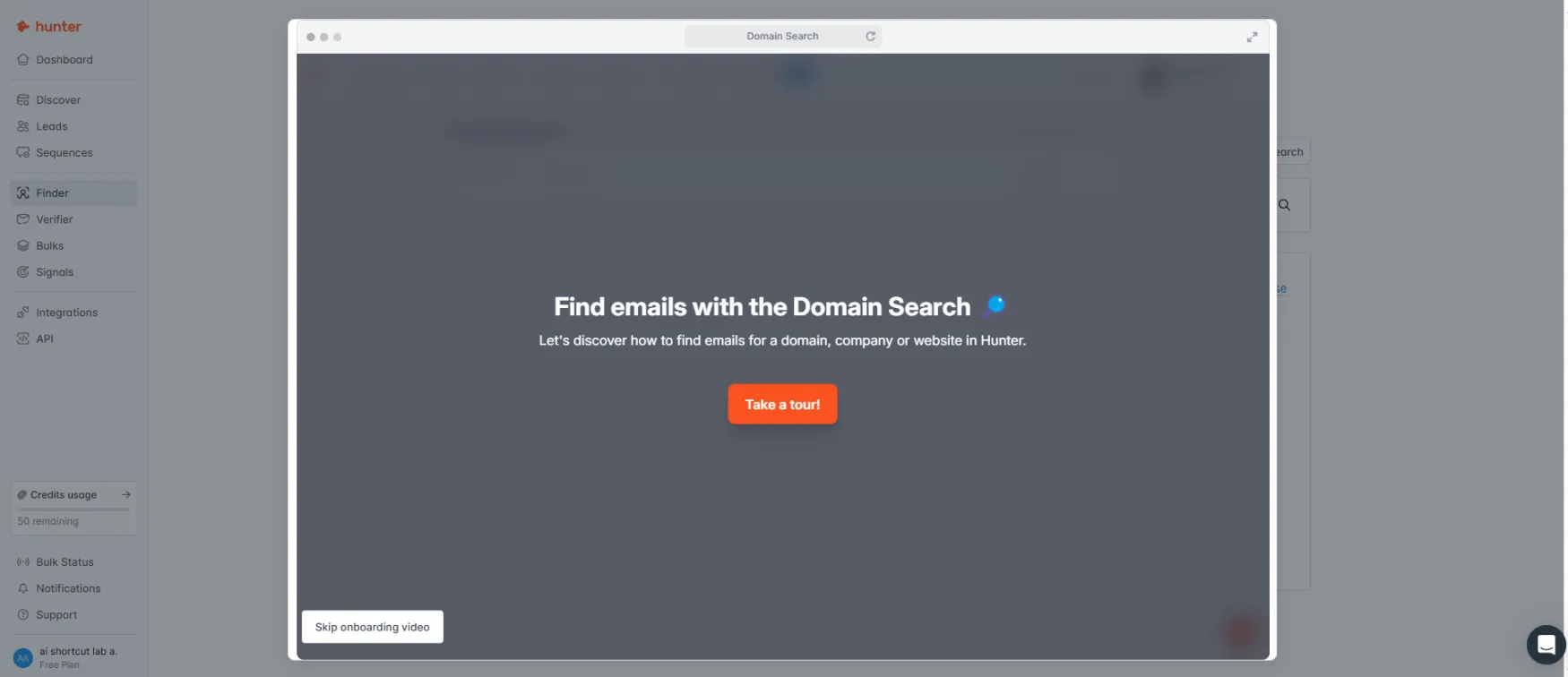
The friction point worth knowing: the free plan credit balance — "50 remaining" — is visible in the bottom left of every screen from the first session. That's a useful design choice. But on the Discover page, several filters are locked behind paid plans (Technologies, Funding, Year founded, Companies similar to) and show padlock icons. You see what's possible before you can access it, which sets expectations correctly but also makes the free plan feel narrower than it is for prospecting.
The interface is clean, minimal, and logically structured. The left sidebar keeps everything accessible in one click: Dashboard, Discover, Leads, Sequences, Finder, Verifier, Bulks, Signals, Integrations, and API. Nothing is buried in submenus. The credit usage counter sits at the bottom of the sidebar and updates in real time — you always know your remaining balance before clicking to reveal an email.
The welcome dashboard skips the noise. Three blocks, three actions. You're prospecting in under two minutes from signup."
The Discover page is the most interesting UI decision. The left panel holds a full filter set — headquarters location, industry, keywords, company size, company name, company type. The right side shows an AI prompt field asking "What companies are you targeting?" with suggested starting points. You can either filter manually or describe your ICP in plain language and let the AI build the search. On the free plan, AI searches are limited to 10 per month, which the interface notes at the bottom of the screen. Advanced filters including Technologies, Funding, and Company Lookalikes are visible but locked behind paid plans — a clear visual indicator rather than a hidden wall.
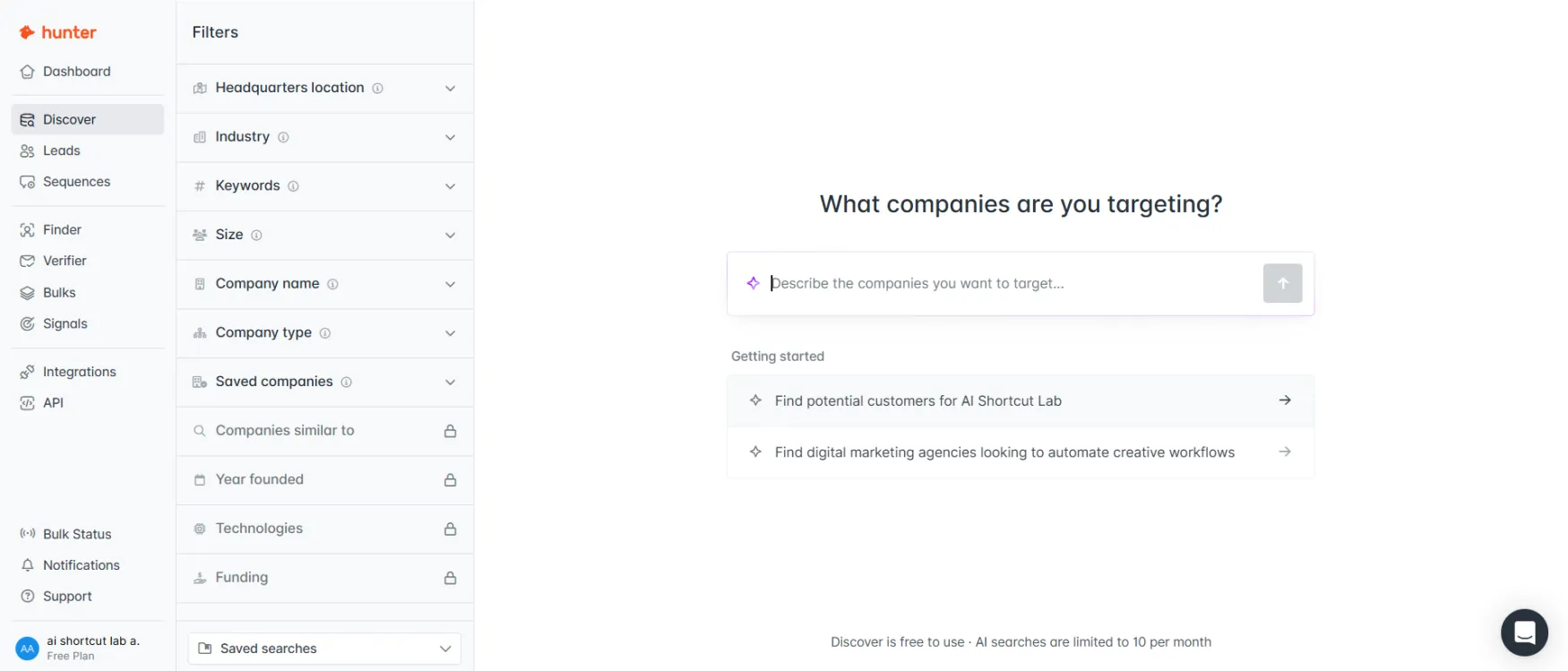
Locked filters show you what's on paid plans before you commit. Technologies and Funding require Starter or above. The padlock icons are honest rather than hidden."
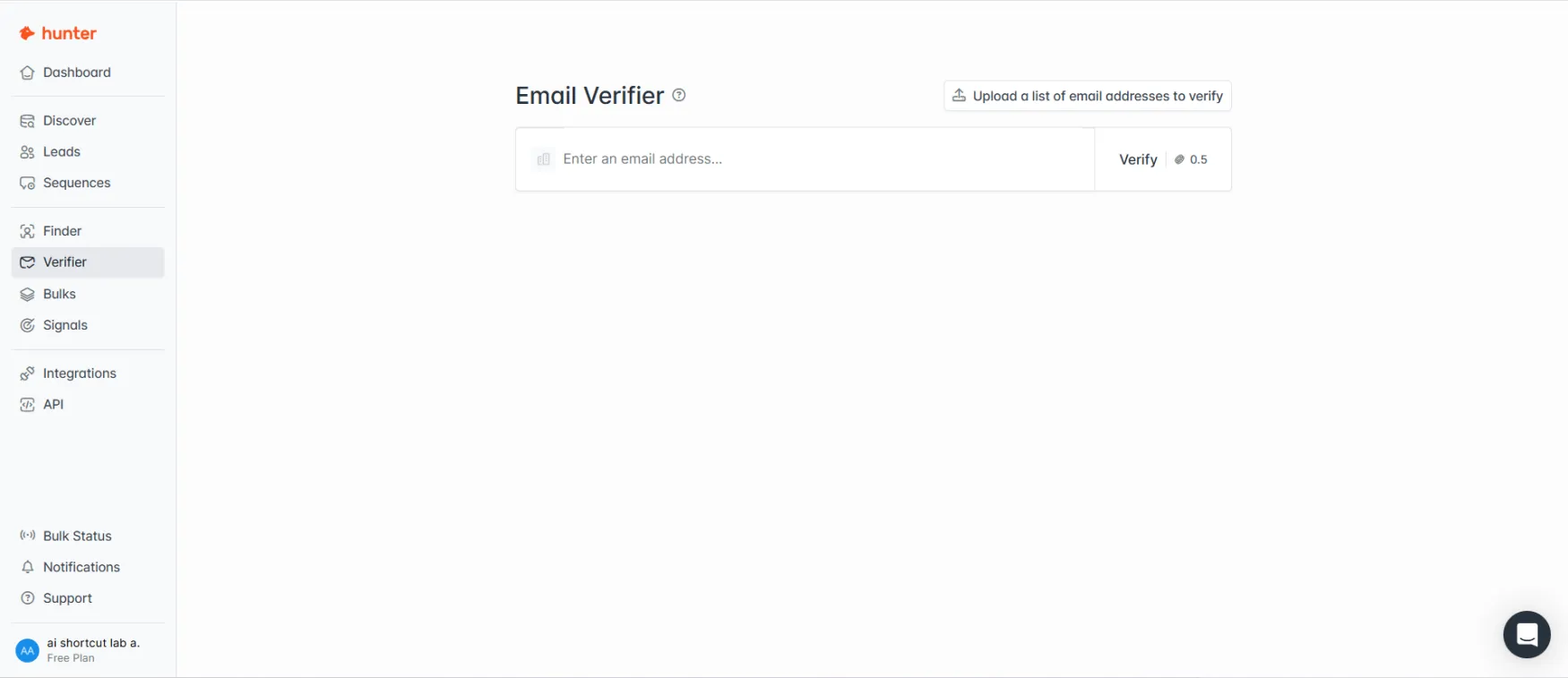
The Verifier is the simplest screen in the product — a single input field with the credit cost (0.5) displayed directly on the Verify button. You see what you're spending before you click. The same cost transparency appears on the Finder: the credit count is visible in the interface before you reveal any address.
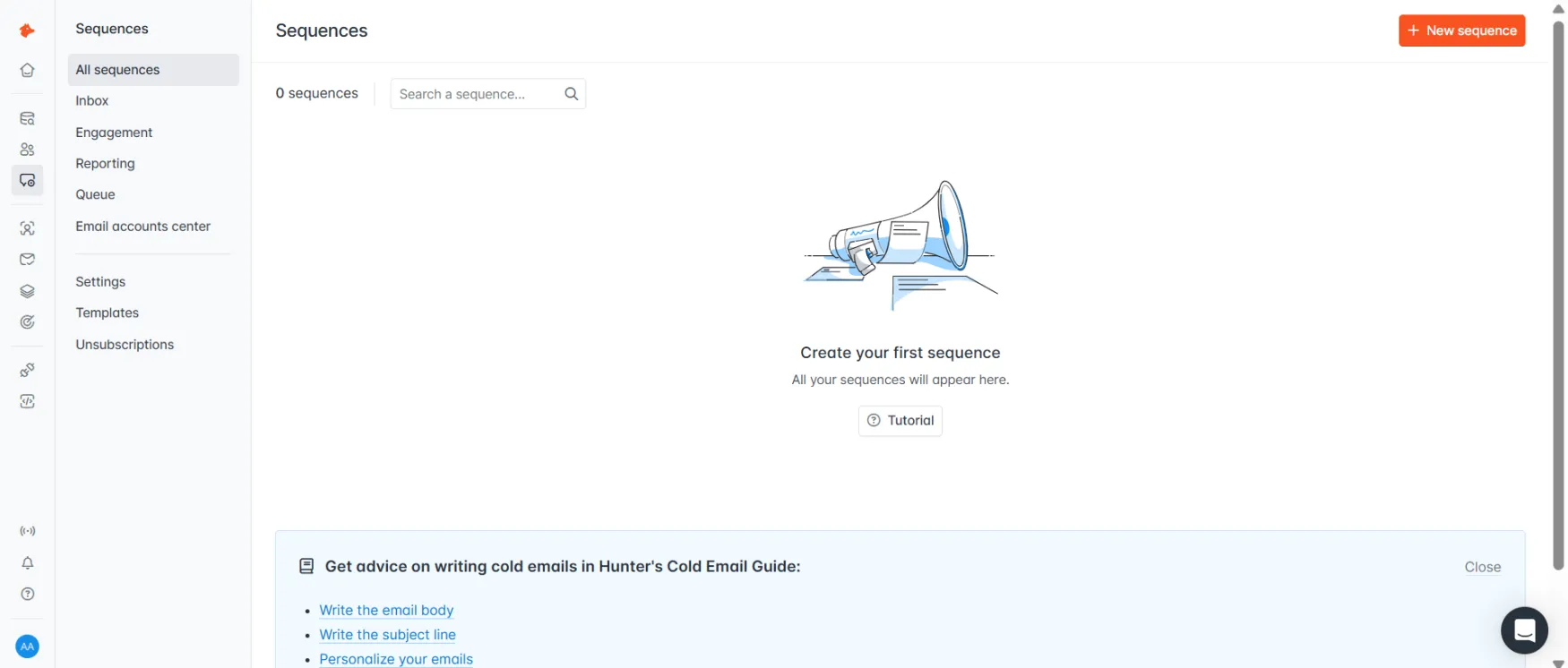
The Sequences section has its own navigation layer — All sequences, Inbox, Engagement, Reporting, Queue, Email accounts center, Settings, Templates, and Unsubscriptions — which means the email tool has the depth of a standalone platform without requiring you to use a separate product. The Integrations page organises CRMs into native connections (HubSpot, Pipedrive, Salesforce, Zoho) and Zapier-powered connections (Close CRM, Copper), making it clear which integrations sync directly and which route through a middleware layer.
The one consistent friction point is the locked filter experience in Discover. The padlock icons are clear, but seeing six of the most useful filters locked on the free plan during your first prospecting session creates pressure to upgrade before you've confirmed whether the database covers your ICP. The fix is to run Domain Search and Email Finder tests first — those tools have no filter locks and give you a direct read on data quality for your specific market.
| Feature | Rating | Details |
|---|---|---|
| Domain Search |
|
Returns all indexed emails for a company domain with source URLs and confidence scores. Coverage is strongest for established companies with a professional web presence. |
| Email Finder |
|
Fast and accurate for individual contact lookup. Free if nothing is found. The same search in the same billing period counts once. |
| Email Verifier |
|
0.5 credits per verification, free if status can't be determined. Auto-verification runs on paid plans before contacts are added to sequences. |
| Sequences |
|
Sends from your own inbox for deliverability. Click tracking and image attachments require a paid plan. Daily sending defaults to 15 per day, adjustable up to 400 for Gmail. |
| AI Writing Assistant |
|
Generates outreach copy from a plain-language brief inside the Sequences editor. Starter and above only. Output is a functional starting point that needs editing to sound like you. |
| Signals |
|
Tracks funding rounds, hiring surges, and company updates. The 20 per month cap on Starter makes it too limited for a consistent workflow. Growth needed for meaningful volume. |
| Chrome Extension |
|
Reveals indexed emails on any web page or LinkedIn profile without leaving the browser. 600,000 users, 4.7 stars from 12,000 reviews. |
| Discover |
|
B2B lead database with industry, headcount, location, and tech stack filters. Advanced filters on paid plans. Unlimited searches — credits only apply when pulling email addresses. |
Hunter's primary support channel is the help centre at help.hunter.io. It's well-organised with articles covering billing, Sequences, data sourcing, integrations, and API usage. For most common questions, the documentation is sufficient to self-serve an answer.
Email support is available on all plans including free. Response time targets are not published publicly. Priority support is listed on Starter and above, but specific SLA targets for each tier aren't documented on the pricing page.
There is no live chat on any plan, including Scale at €299/month. If you hit a billing issue or a Sequences problem outside business hours, the only path is a help centre article or an email to the support team. Know that before you build a daily workflow here.
Hunter publishes a public changelog at hunter.io/changelog and an engineering blog. The changelog shows active development. No significant outages are documented on the status page at status.hunter.io.
Hunter is used by more than 6 million professionals and holds a 4.6/5 rating on Capterra and a 4.4/5 rating on G2, per the official website. The Chrome extension has 12,000 reviews and a 4.7 star rating from 600,000 users.
From official customer testimonials at hunter.io/customers: Sean Gallagher at Lattice describes Hunter as a tool for saving time and building pipelines, specifically highlighting the email verifier as a significant time saver. Andrew Gazdecki, CEO of Acquire.com, describes using Hunter Sequences to source qualified buyers for clients, noting it's easy to use and delivered results. Ehsan Rishat at REsimpli reports handling email outreach in-house with Hunter and saving thousands of euros per month in outsourcing costs.
Data quality and source transparency are the most consistent points of praise across official case studies. Users in regulated industries or European markets specifically cite the ability to tell recipients where their contact information came from as a meaningful operational advantage.

See how Hunter stacks up against Apollo.io in our detailed comparison.

See how Hunter stacks up against Lusha in our detailed comparison.

See how Hunter stacks up against ZoomInfo in our detailed comparison.
See how Hunter stacks up against UpLead in our detailed comparison.
See how Hunter stacks up against Adapt.io in our detailed comparison.
