
An end-to-end AI ad agent that transforms URLs into high-performing video creatives in minutes.
8.0/10. Creatify is the best tool in its category for solo founders who run paid ads.
The core functionality works. You paste a product URL, pick an AI actor, and get a watchable video ad in roughly 8 to 10 minutes. No camera, no editor, no stock footage license. For someone spending $150 to $500 per video on UGC creators, the math flips immediately at $19/month on Starter or $49/month on Pro.
What holds the score below 9 is the credit system and the feature split between plans. The Starter plan at $19/month gives you 100 credits, which is 20 videos per month. That's enough if you're running a steady ad rotation, but if you're doing creative testing — the actual highest-value use case for this tool — you'll chew through credits faster than expected. And the analytics that tell you which creative is converting? Those are Pro-only. So the plan that makes the most sense for serious paid advertisers is $49/month, not $19/month.
Ideal user: An e-commerce founder or DTC brand owner running their own Meta or TikTok ad campaigns, producing at least 5 to 10 new creatives per month, who wants to test multiple hooks and styles without coordinating a production day.
If Creatify isn't the right fit: HeyGen at $29/month covers avatar-based video without the performance ad focus. For static image ads or lighter video needs, Canva Pro at $15/month handles the basics.
Bottom line: Test the free plan with a real product URL first. If the output quality clears your standard and you're running paid ads regularly, Starter is the right starting point. Upgrade to Pro when you're ready to track what's actually converting.
Skip Creatify if you don't run paid ads. It's built for performance advertising, and almost every feature is designed around that context. If you want video for your website, your social organic presence, or onboarding, you're paying for a lot of tooling you won't use. Loom ($12.50/month) or a simple screen recorder covers those use cases for less.
Skip it if your products aren't visual. URL to Video pulls images and copy from your product page. If your product page is light on imagery, incomplete, or text-heavy (consulting, services, SaaS landing pages without screenshots), the output will be noticeably weaker. The tool works best when it has something visual to anchor to.
Skip it if you need videos longer than 10 minutes. Starter caps video length at 2 minutes. Pro caps at 10 minutes. If you're producing product demos, walkthroughs, or longer explainers, you'll hit that ceiling. Descript ($24/month) or HeyGen handle longer formats better.
Skip it if you need one video, not a testing system. Creatify is priced for volume. If you produce one or two ads a month and don't plan to test variations, the value case doesn't hold. A freelance videographer or a one-off Fiverr video might be simpler and similarly priced.
Solo founders running paid ads have always faced a production bottleneck. A single UGC video from a creator typically costs $150 to $500 and takes 3 to 7 days to produce. That cadence is fine if you're managing one creative per month, but paid ad performance testing requires volume. You need to test different hooks, different presenters, different angles. At $300 per test, creative testing becomes unaffordable for a one-person operation.
Creatify solves the production cost side of this problem. It's not the first AI video tool, but it's built specifically for ad performance rather than content creation, which changes the product decisions throughout. The Inspiration Library, Ad Clone, Competitor Ad Tracker, and Batch Generation all point at the same job: produce more creative variations, test them faster, kill what doesn't work. That focus makes the tool more useful than a general AI video generator for this specific use case.
The URL to Video feature is what makes the entry barrier near-zero. Most competing tools require you to write a script, source footage, or design assets before you can produce anything. Creatify produces a complete draft from a URL. That's a meaningful workflow difference for a founder who has 20 minutes, not 2 hours.
The ad performance focus is also what limits the tool for anyone outside that use case. If you're creating product demo videos for your website, onboarding videos for new clients, or social content that isn't ad-driven, you're working against the grain. The AI actor formats, the script templates, and the output style are all calibrated for paid social. They produce content that looks like an ad because that's what they're designed to produce.
The 2-minute cap on Starter and 10-minute cap on Pro also limits use cases that require longer video formats. Course creators, service businesses that want explainer videos, and SaaS founders wanting product walkthroughs will hit this constraint. There are better tools for those use cases.
And the credit system, while not unusual for AI tools, shapes how you can use Creatify in a way that has real implications for testing. On Starter (100 credits = 20 videos), a proper A/B test with 5 variations of a hook across 2 products consumes 50% of your monthly budget in one session. You can do it, but you'll feel the constraint.
This is what solo founders need to understand before subscribing to Starter: the features that make Creatify most useful for paid ad performance are all on Pro.
Ad Insights and Creative Analytics (which tell you which creative is actually converting) are Pro-only. Ad Launcher, which pushes ads directly to Meta and TikTok without platform switching, is Pro-only. Ad Clone, which lets you reverse-engineer a competitor's best-performing ad structure, is Pro-only. Competitor Ad Tracker is Pro-only. Custom Avatars (which let you use your own face or a brand spokesperson) are Pro-only.
What Starter gives you is the production workflow. What Pro gives you is the performance layer on top of it.
If you're running paid ads seriously, the production workflow without the performance layer is only half the picture. You'll end up exporting videos from Creatify, uploading them manually to Meta Ads Manager, pulling performance data there, then coming back to Creatify to make changes. That works, but it's a fragmented workflow. Pro closes that loop.
The practical takeaway: If you're testing the tool to see if the output quality works for your products, start on Starter or the free plan. That's a fair evaluation. But if you're planning to use Creatify as your ongoing ad production system, budget for Pro from the start. The $30/month difference is recovered quickly once you're running any real ad spend.
The task: Create a 15-second UGC-style video ad for a skincare product with a Shopify product page, intended for Meta Stories and Reels (9:16).
Step 1 (1 min): Sign up with an email address. No credit card required on the free plan. You land on the dashboard immediately — no setup wizard, no onboarding questionnaire. URL to Video is the first option visible.
Step 2 (1 min): Paste the Shopify product URL. Creatify fetches the product name, description, and images automatically. If the page has 5 product images, it pulls all 5. You can review and edit the pulled content before proceeding.
Step 3 (1 min): Review the auto-generated script. It produces a 3-part structure: hook, benefit, call to action. It's serviceable as-is for a first test, but editing the hook takes 30 seconds and meaningfully improves the output. Don't skip this step.
Step 4 (1 min): Choose an AI actor from the library. On the free plan and Starter, you have 300 options organized by gender, age range, and style (casual, professional, UGC-style). Pick whoever looks closest to your target customer.
Step 5 (2 min): Choose aspect ratio (9:16 for this test), pick background music from the built-in library, confirm, and submit for generation.
Step 6 (4–5 min): Wait for the video to render. The progress counter is visible throughout. First render took about 4 minutes.
Total time: 9 to 10 minutes. The output was a 15-second UGC-style ad with lip-synced voiceover, product shots cut in, background music, and a text overlay CTA. It needed one edit to the CTA text, adding roughly 2 more minutes. Total to a usable first draft: under 15 minutes. That single video used 5 credits.
The part that surprised me: the lip sync on the AI actor was better than expected — it doesn't look like a game character anymore. The part that requires attention: the auto-generated hook was generic. Every test ad opened with some version of "Are you struggling with [problem]?" Edit the hook before you render.
At $19/month, Creatify Starter costs the equivalent of roughly 6 minutes of a freelance video editor's time at a standard $75/hour rate. If it replaces even one UGC creator video per month (lowest market rate: roughly $150), the ROI is 8x in month one.
When the ROI works: You're producing 5 or more video ad variations per month and already spending on paid ads. At $19/month for 20 videos, that's $0.95 per video. The comparison to UGC creator rates is almost unfair.
When the ROI doesn't work: You produce one or two ads a month and don't test variations. At that volume, the credit bank goes mostly unused and you're paying a monthly subscription for something a one-off hire could cover.
The honest break-even on Pro ($49/month): If Pro replaces 2 freelance UGC videos per month at $150 each, that's a $300 saving against a $49 cost. You're break-even before you've used a third of your monthly credit allowance. The upgrade to Pro makes sense the moment you start caring which ad is actually converting, since analytics are Pro-only.
Free — $0/month: 10 credits per month. Up to 2 watermarked video ads or 20 image ads. 300 AI actors, 10 premium AI models, 40 ad templates. No credit card required. Credits reset monthly and unused credits don't carry over (confirmed in official FAQ). Enough to test the URL to Video workflow on a real product, but not enough to evaluate Batch Generation or run a proper creative test.
Starter — $19/month: 100 credits per month (20 watermark-free video ads or 200 image ads). All creation tools, 300 AI actors, 10+ premium AI models, 40 ad templates, videos up to 2 minutes, 75+ language support, 9:16/16:9/1:1 aspect ratios. No custom avatars. No Ad Clone. No Competitor Ad Tracker. No analytics. One seat.
Pro — $49/month: 200 credits base, scalable to 5,000 at higher price tiers. 1,500 AI actors, 30+ premium AI models, 200+ ad templates, videos up to 10 minutes, 3 custom avatars, Competitor Ad Tracker (up to 10 brands), Ad Clone, Ad Launcher (Meta/TikTok/AppLovin), Ad Insights and Creative Analytics, team collaboration for up to 3 seats.
Enterprise — Custom: 1,200 credits/year minimum, multiple seats and brand spaces, API access with volume discounts, white-label, dedicated account manager.
One pricing note worth confirming before subscribing: the pricing page displays a "SAVE 50% ON ANNUAL PLAN" toggle but doesn't clearly show both monthly and annual rates side by side. Confirm which billing cycle the $19/$49 prices reflect before entering payment details.
Unused credits don't carry over to the next month on any plan. Confirmed in the official FAQ.
Pricing last checked March 2026. Verify at creatify.ai/pricing before subscribing.
You're generating your first video within 5 minutes of creating an account. That's genuinely rare for a tool with this much surface area.
There's no required setup — no profile to complete, no preferences to configure, no integrations to install before you can use the core feature. You land on a clean dashboard with creation tools listed down the left side. URL to Video is first. Click it, paste a URL, and you're moving.
The one thing that catches people off guard is the credit counter. It's displayed in the top navigation bar and it starts counting the moment you generate. On the free plan, you have 10 credits — that's 2 videos. After those 2 videos, you'll hit a paywall. It's not hidden (the counter is always visible), but new users often don't realize how fast it moves until they've used their free allocation on a test they didn't care about.
Magic moment: The first time URL to Video pulls a product page and auto-populates the script. It's genuinely fast and the quality of the pulled content is better than expected for clean product pages.
Friction point: Finding the Batch Generation feature isn't immediately obvious. It's not prominently surfaced on the dashboard — you have to navigate into it. For solo founders, this is the highest-value feature, so it being buried is a real usability miss.
No credit card required to start. The free plan is functional, not just a preview. But the 10-credit limit means you'll hit the upgrade prompt quickly if you're genuinely testing.
The interface is clean and loads fast. It doesn't feel cluttered for a tool with this many capabilities. The left-side navigation separates creation tools, research tools (Inspiration Library, Competitor Tracker), and distribution/analytics clearly enough that you can find things without a manual.
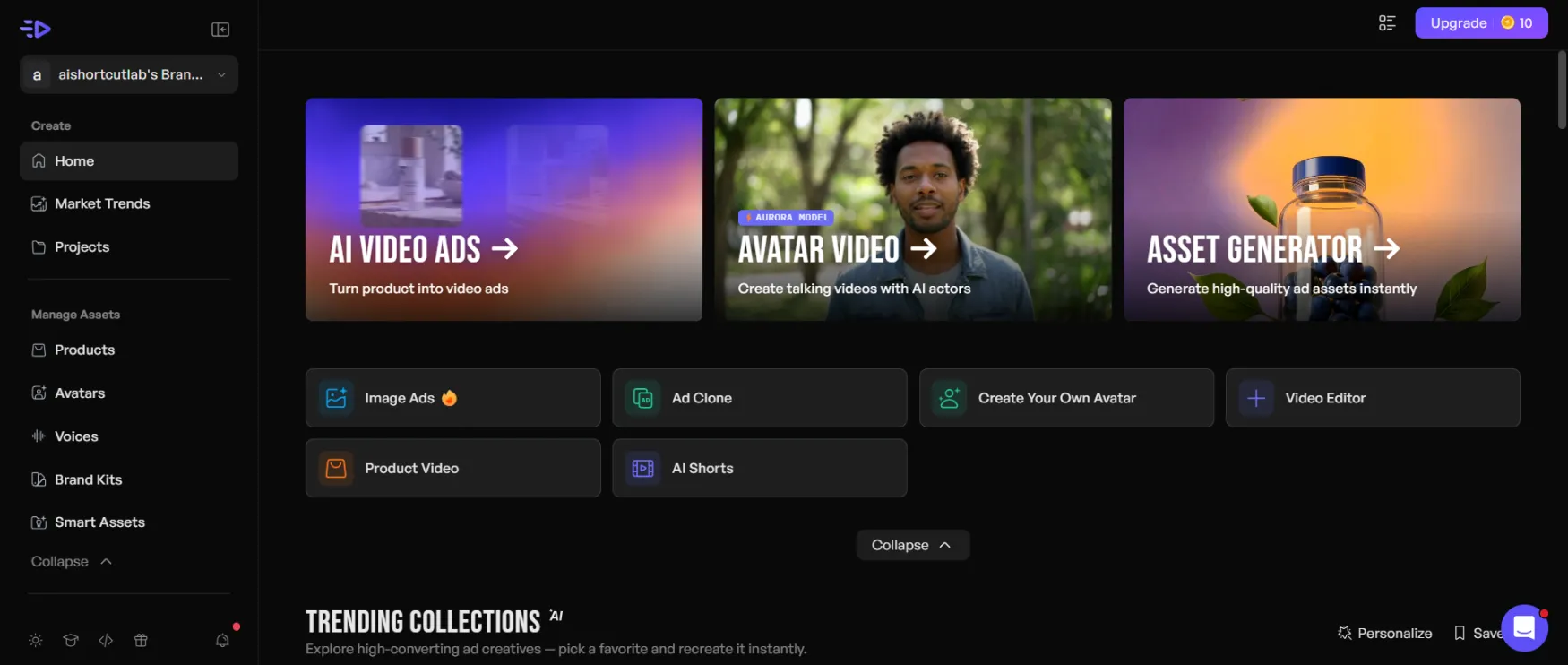
The creation flow itself is the strongest part of the UX. It's genuinely linear: input, script, actor, format, generate. You can't get lost in it. The progress bar during generation is accurate and gives you a real sense of wait time rather than a spinner you don't trust.
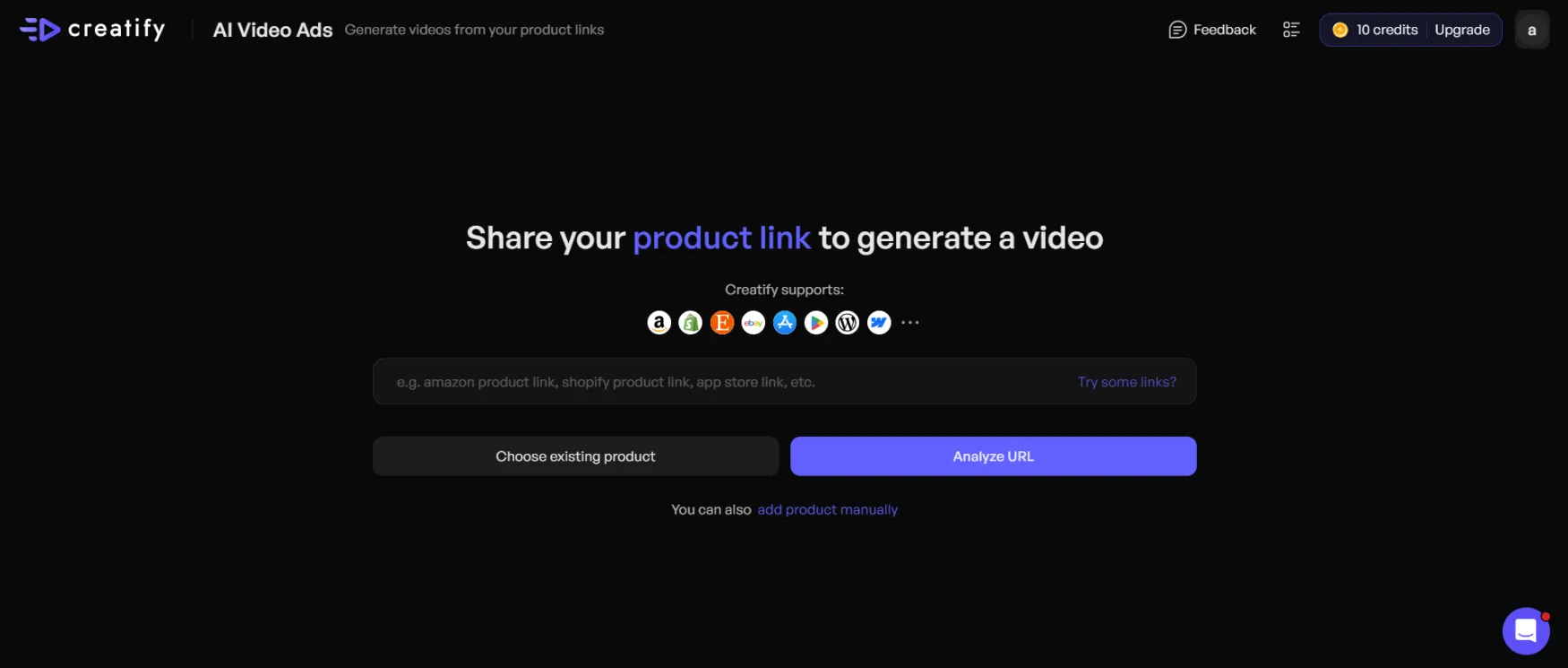
The creation flow is genuinely linear. There's no hidden step or configuration you have to discover. This is what 'easy onboarding' actually looks like.
Two things that create friction. First, the editor after generation. Once you have a video, editing specific elements (swapping the AI actor, changing the music, adjusting a specific clip) requires going back through the creation flow rather than editing the output directly. It's not painful, but it's not as fluid as a traditional video editor. Second, the credit counter psychology. It's always visible, which is good for awareness, but it also creates a low-level anxiety about experimentation. You start rationing generations instead of testing freely. On Starter especially, this shapes behavior in a way that works against the tool's core promise.
No intrusive upgrade prompts mid-workflow. The paywalled features (Ad Clone, analytics) simply don't appear on Starter — they're visible as locked items in the navigation, but they don't interrupt active creation sessions.
| Feature | Rating | Details |
|---|---|---|
| URL to Video |
|
Paste a product URL and get a complete video draft with script, presenter, voiceover, and CTA. Works reliably for clean Shopify and Amazon product pages. Output degrades on pages with thin copy or low-quality images. |
| AI Actor Library |
|
300 actors on Free and Starter, 1,500 on Pro. Lip sync quality at 15 to 30 seconds is convincing for paid social. More noticeable as AI for longer formats or premium brand campaigns. |
| Batch Generation |
|
Create up to 50 video variations from a single product input in one generation run. The feature that changes the unit economics of creative testing. Available on paid plans only. |
| Ad Clone |
|
Recreates the structure and format of a competitor or top-performing ad for your own product. Works well for format remixing. Pro-only. Most useful once you have clear ad data or competitor references. |
| Ad Launcher and Analytics |
|
Direct connections to Meta, TikTok, and AppLovin with per-creative performance tracking (spend, ROAS, CTR). Removes platform-switching for solo founders managing their own ad accounts. Pro-only. |
| Asset Generator |
|
Access to multiple AI image generation models in one place, up to 30+ on Pro. Useful for supplementary product imagery, but not a primary reason to choose Creatify over dedicated image generation tools. |
| Inspiration Library |
|
Access to 10 million Meta ads sorted by industry and performance signal. Useful for competitive research and hook ideation. 40 templates on Free and Starter, 200+ on Pro. |
Creatify holds a 4.8/5 rating on G2 with 40+ badges as of March 2026 (source: creatify.ai). That's a strong signal for a tool at this price point.
Per the official pricing comparison table, 24/7 customer support is listed as an Enterprise-tier feature. Starter and Pro don't have this listed explicitly — worth confirming directly with the company before subscribing if support accessibility is a priority for you.
The company is SOC 2 Type II certified, confirmed on the official homepage. For a solo founder storing product assets and ad account credentials in a third-party tool, that certification matters. Most tools at this price point don't have it.
Creatify has raised $24M from named institutional investors including WndrCo, Kindred Ventures, and Comcast Ventures (source: creatify.ai/about). It's not a bootstrapped side project. That reduces, though doesn't eliminate, platform continuity risk.
This review uses only official Creatify sources per editorial policy, so independent review platform data isn't quoted here. What official materials confirm: 4.8/5 on G2 with 40+ badges, 1 million advertisers, 15,000 brands and agencies, and 10 million ads generated (figures from the official homepage, March 2026).
The case studies published at creatify.ai/case-study are agency and e-commerce focused, with documented results including 45% CPA reduction (agency case study), 47.6% CTR increase (1MORE e-commerce), and $3,000 saved per video (Whole Life Pet). These are company-published figures, not independently verified. The consistent pattern across case studies is production cost reduction and creative testing volume — not a single performance breakthrough from any one video.
For independent review data, check G2 directly before subscribing. For community discussion, r/ecommerce and r/PPC are the most relevant forums for this tool's use case.
